Lingye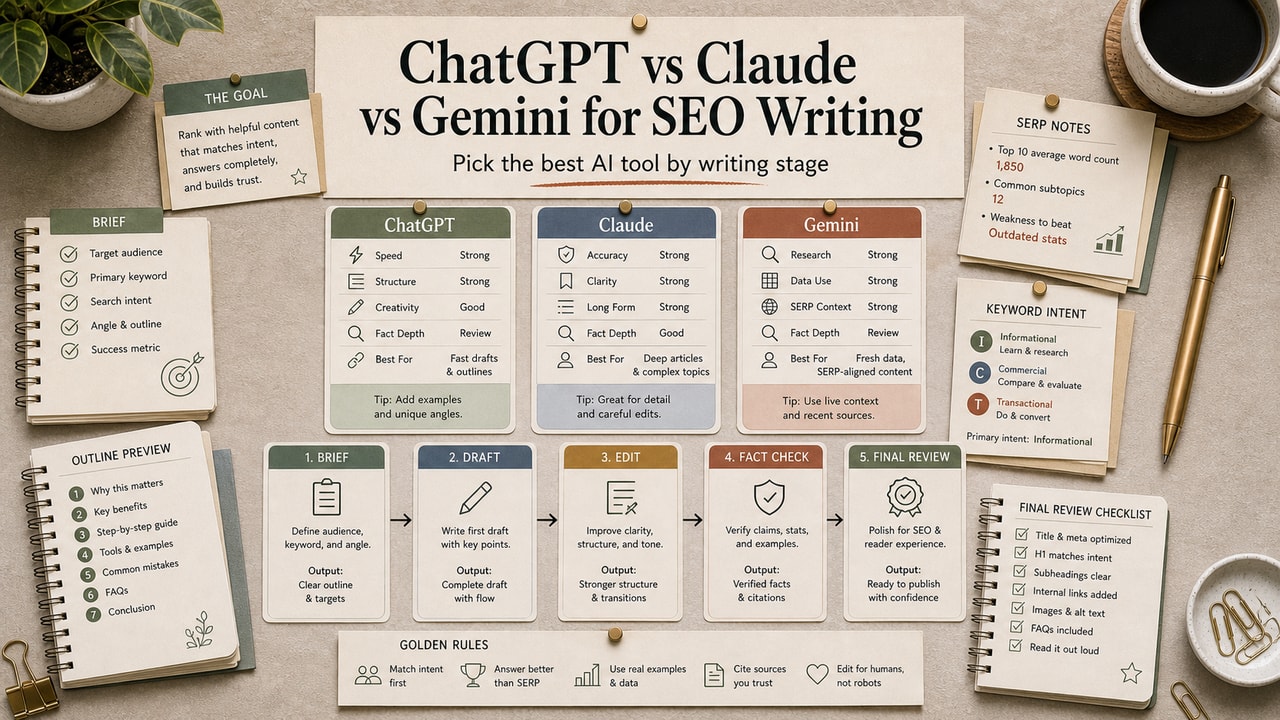
Most ChatGPT vs Claude vs Gemini comparisons end with a vague answer: all three are good. For SEO writing, that answer is not useful. The better question is which tool should own each stage of the content workflow. Keyword research, search-intent notes, content briefs, long-form drafts, metadata, and refresh audits stress different parts of the model. This guide turns the comparison into a practical assignment map.
Quick Answer
For SEO writing, do not choose ChatGPT, Claude, or Gemini as one winner for every task. Assign the tool by workflow stage: use a search-capable workflow or SEO tool for keyword and SERP research, use Claude or another long-context model for brief building and draft review, use ChatGPT for fast title, meta, and FAQ variants, and use Gemini when your work depends on Google Workspace material or source checking. The commercial decision is not simply which subscription is best; it is which stages create enough repeat value to justify another paid tool. Plans, limits, model names, and pricing change often, so verify vendor pages before buying and keep the final editorial review with a human, especially before publishing live comparisons.
What This Workflow Is
This is a stage-by-stage decision workflow for choosing AI tools in an SEO content process. It is not a lab benchmark and it does not assume one model is permanently best. The goal is to reduce editing waste by matching each tool to the job it handles best in your workflow.
Definition you can quote: ChatGPT, Claude, and Gemini are general-purpose AI assistants. For SEO writing, their value depends less on brand preference and more on how well each tool supports research, structure, drafting, source review, and short-form iteration.
Who This Workflow Is For
- Best for: SEO writers, bloggers, content leads, and small teams deciding which AI tools deserve a seat in the writing stack.
- Also useful for: agencies creating a repeatable tool policy for writers and editors.
- Not ideal for: short-form ad copy, sales-page copy, or teams that cannot use external AI tools because of client data rules.
Tools You Need
| Tool or source | Use it for | Source caveat |
|---|---|---|
| ChatGPT | Idea expansion, title/meta variants, prompt iteration | Use a search-enabled setup only when current SERP evidence matters |
| Claude | Long briefs, draft review, voice cleanup, refresh audits | Verify facts externally; long context is not a truth guarantee |
| Gemini | Google Workspace-adjacent research and source checking | Still needs human review and current source validation |
| Google helpful content guidance | Editorial guardrails | Use it to check helpfulness, not to justify thin AI output |
Do not buy another AI subscription because a comparison article says it is better. Buy or keep a tool only when it repeatedly removes review time from a stage you run every week, such as briefs, refresh audits, or metadata production.
Workflow Summary
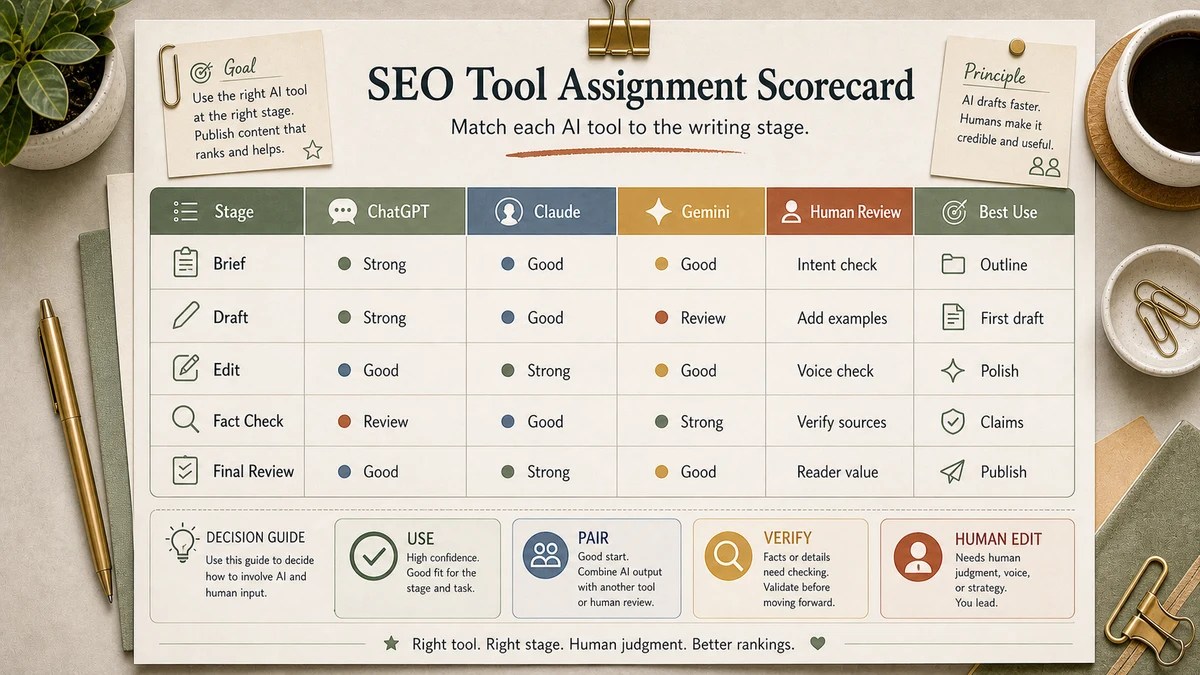
| Stage | Primary pick | Why it fits |
|---|---|---|
| Keyword and SERP research | Search-enabled workflow or SEO tool | Current evidence matters more than prose quality |
| Search-intent analysis | Claude or ChatGPT with source notes | The model must compare competing pages without losing constraints |
| Content brief | Claude | Briefs benefit from structure, constraints, and long context |
| Long-form draft | Claude or your strongest voice model | Draft quality depends on instruction following and tone control |
| Metadata and FAQ | ChatGPT | Short variants are easier to test quickly |
| Refresh audit | Claude plus manual source checks | Old post, SERP notes, and change log can sit in one review pass |
Step-by-Step Workflow
Step 1: Split the SEO job into stages
Do not ask one tool to do keyword research, brief writing, drafting, fact checking, and meta text in one pass. Split the work so each output can be reviewed independently.
Step 2: Decide where current data is required
Keyword ideas, SERP patterns, pricing, product features, and tool limits need current sources. Use official pages, Google results, or a dedicated SEO tool rather than trusting model memory.
Step 3: Use a long-context model for the brief
Paste the target keyword, search-intent notes, competitor headings, reader problem, internal-link targets, and editorial angle. Ask for a brief, not a draft.
Step 4: Draft from the approved brief
Use the model that produces the least cleanup for your site voice. For many editorial workflows that is Claude, but the right answer is the one your reviewer can edit fastest.
Step 5: Run a human helpfulness review
Before publishing, check source accuracy, reader decision value, original examples, internal links, and whether the article helps the reader do something specific.
Copy-and-Paste Prompt
You are helping choose AI tools for one SEO article workflow.

# Article job
Primary keyword: [keyword]
Reader intent: [what the reader is trying to decide or do]
Content type: [tutorial, comparison, checklist, refresh, review]
Current source needs: [pricing, tools, policies, SERP, none]
Human review capacity: [light, normal, strict]
Available tools: [ChatGPT, Claude, Gemini, SEO tool]

Create a stage assignment table with:
1. Workflow stage
2. Recommended tool
3. Why that tool fits this stage
4. Human verification needed
5. When to switch tools

Rules:
- Do not assume model memory is current.
- Do not invent pricing or product limits.
- Flag any stage that needs official sources.
Example Input
Primary keyword: AI SEO outline generator.
Reader intent: a blogger wants a workflow that turns keywords into a useful outline without thin content.
Content type: tutorial.
Current source needs: Google guidance, tool limits, internal links.
Human review capacity: strict.
Available tools: ChatGPT, Claude, Gemini, Ahrefs export.
Example Output
| Stage | Tool | Human check |
|---|---|---|
| Keyword grouping | SEO tool export plus ChatGPT cleanup | Confirm clusters against real SERP intent |
| Brief | Claude | Check that H2s answer reader decisions, not just keywords |
| Draft | Claude | Rewrite intro, examples, and recommendation with site voice |
| Source check | Gemini or manual Google/source review | Open official pages for mutable claims |
| Meta variants | ChatGPT | Choose one title and description that match search intent |
Tested Workflow Notes
Our editorial rule is simple: judge the tool by review time, not by the nicest first draft. A draft that sounds clean but hides unsupported claims is more expensive than a rough draft with visible gaps. For SEO content, the winning setup is usually the one that preserves evidence, keeps the angle specific, and makes the human editor's decisions easier.
The most common failure is using an AI answer as if it were live search data. If the section depends on pricing, plan limits, product names, model availability, or Google's current policy, the article needs a source check. Model confidence is not evidence.
Workflow Artifact: SEO Tool Assignment Scorecard
| Question | Use ChatGPT when... | Use Claude when... | Use Gemini when... |
|---|---|---|---|
| Does the task need many short variants? | Yes: titles, meta, FAQ angles | No: use for longer structure | Only if source context is in Google tools |
| Does the task need long context? | Sometimes | Usually the better fit | Useful for source-heavy review |
| Does the task need current evidence? | Only with search/source workflow | Only with pasted sources | Useful, but still verify official pages |
| Is this a final editorial decision? | No | No | No |
Switching Rules: When to Change Tools
| Signal | What it means | Switch to |
|---|---|---|
| You keep rewriting intros and examples | The drafting tool is not matching your site voice | A stronger long-form drafter or a tighter brief |
| The tool names sources but cannot preserve them | Research and drafting are being mixed too early | Separate source collection from draft writing |
| Metadata takes more than one or two rounds | The prompt lacks search intent and angle constraints | Short-variant workflow with clearer inputs |
| Every article needs manual fact repair | The workflow is over-trusting model memory | Manual official-source pass before drafting |
This is also the revenue lens: the best SEO tool stack is the one that lowers expensive editorial cleanup while keeping the article specific enough to retain readers.
Pitfalls We've Actually Hit
- Forcing one tool through every stage. The process feels simpler, but the editor ends up fixing the tool's weak stage later.
- Using model memory for keyword research. The suggestions can sound specific while missing current search intent. Source the SERP before writing.
- Treating a smooth draft as a checked draft. Nice prose can still contain stale pricing, unsupported comparisons, or generic examples.
Common Mistakes
- Choosing a tool by brand instead of stage. SEO writing is a workflow, not a single prompt.
- Skipping the content brief. A draft without a brief usually repeats common advice.
- Letting AI invent examples. Use sample inputs and clearly labeled artifacts, or verify real examples before publishing.
- Making pricing claims from memory. Link official vendor pages or remove the number.
- Ignoring internal links. Good AI-assisted SEO still needs related workflows and next steps.
Tool Alternatives
| Need | Alternative | Trade-off |
|---|---|---|
| SERP research | Perplexity or an SEO platform | Better citation surface, less useful for full article drafting |
| Keyword data | Ahrefs, Semrush, Google Search Console | Better data, higher setup or subscription cost |
| Drafting | Your preferred model plus a strict brief | Voice quality depends on the brief and human editor |
| Fact review | Manual official-source pass | Slower, but safer for mutable claims |
FAQ
Which AI tool is best for SEO writing?
There is no single permanent winner. Use the tool that best fits the stage: source-aware research for current facts, long-context help for briefs and drafts, and fast iteration for metadata.
Is Claude better than ChatGPT for blog writing?
Claude is often easier to use for long structured drafts, but the better question is which output needs less editing for your site voice and fact standard.
Should I use Gemini for SEO writing?
Use Gemini when the work benefits from Google Workspace context or source-heavy review. Do not treat it as a replacement for human fact checking.
How should I decide whether to pay for more than one tool?
Track where each tool saves review time. If a second tool only adds novelty, skip it. If it repeatedly improves a high-volume stage, it may be worth checking current pricing.
Will using AI for SEO writing hurt rankings?
AI assistance itself is not the core issue. Thin, unhelpful, unverified content is the risk. Keep original examples, source checks, human editing, and reader value in the workflow.
Final Recommendation
If you take one thing from this comparison, use a stage map instead of a winner-takes-all tool choice. Assign one tool to research support, one to structure and drafting, one to short variants if needed, and keep source verification outside model memory.
For your next article, time the review stage. The tool that creates the least cleanup while preserving source accuracy and reader decision value is the tool that belongs in your SEO stack.