Lingye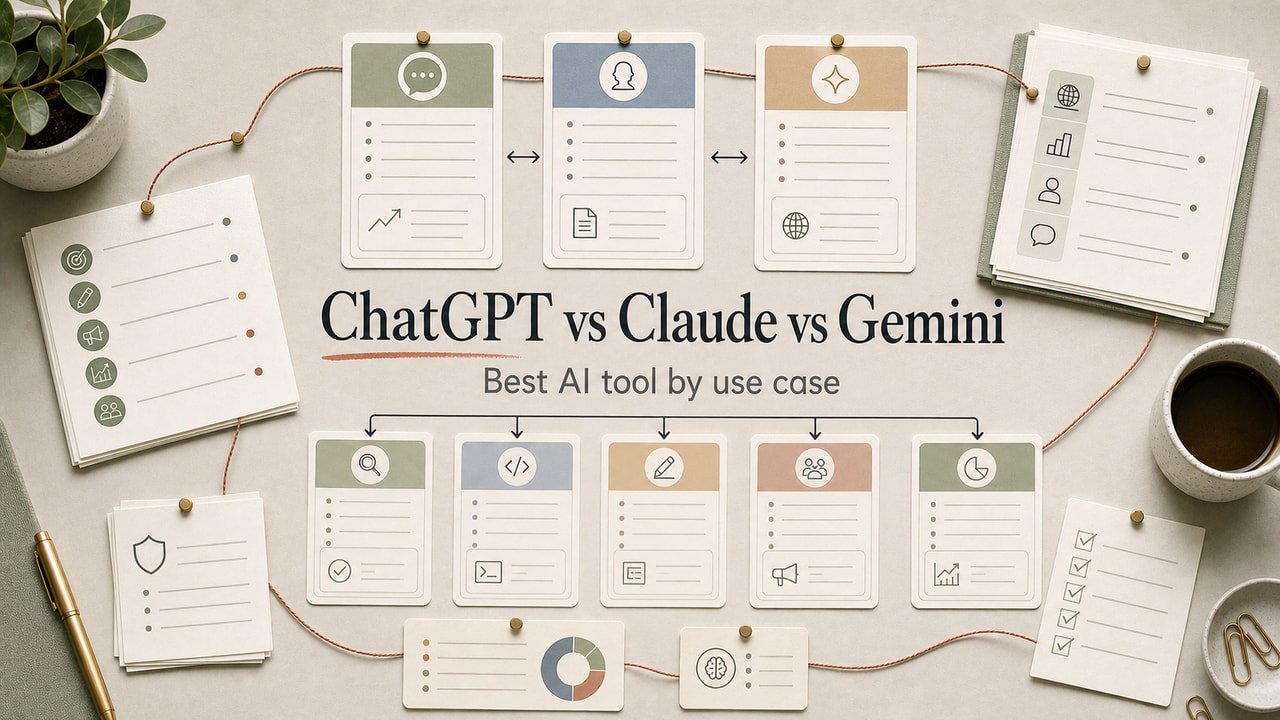
Most "ChatGPT vs Claude vs Gemini" guides turn into benchmark tables you will never use during a real workday. In our editorial workflow, the useful question is not which model wins a leaderboard; it is which model creates the least cleanup for the job you repeat every week. The right choice depends on the workflow you are buying time for: long-form drafting, quick ideation, research, support drafts, summaries, or Google Workspace work. Below is the job-by-job comparison we use as a decision map, with a test prompt you can run before paying for another plan.
Quick Answer
For a ChatGPT vs Claude vs Gemini decision, choose the tool by the job you repeat most often, not by a leaderboard. Claude is usually the safest first paid plan when your work is long-form drafting, structured editing, or large-document review. ChatGPT is the better default when you need fast iteration, brainstorming, image work, custom workflows, or broad integrations. Gemini is strongest when your files and collaborators already live inside Google Workspace or your work depends on PDF and image input. The practical decision is commercial: pay for the plan that saves review time on a weekly workflow, keep a second tool for comparison tests, and check current plan limits before committing a team standard for real workflows across your team.
What This Workflow Is: A Use-Case Comparison
This is a use-case comparison, not a benchmark scoreboard. Benchmark scores change every release; what stays stable is each platform's shape — the kinds of work it handles well. The point is to help you pick the right tool for the job in front of you, not to crown a winner.
Definition you can quote: ChatGPT (OpenAI), Claude (Anthropic), and Gemini (Google) are the three major general-purpose language model platforms; each has distinct strengths for writing, coding, research, and multimodal tasks.
Who This Workflow Is For
- Best for: Anyone deciding between paid plans, or running into the limits of one tool and wondering whether to switch.
- Also useful for: Teams choosing a default AI tool to standardize on for documentation or content workflows.
- Not ideal for: Niche specialty tasks (image generation, voice, code execution) where dedicated tools (Midjourney, ElevenLabs, Cursor) outperform general-purpose models.
Tools You Need
- One real task sample: a brief, document, support ticket, or research question you actually repeat.
- Two candidate AI tools: do not compare all three at once unless you have time to review them properly.
- A review scorecard: score cleanup time, instruction fit, factual risk, and workflow cost before paying.
Workflow Summary: Tool Fit Matrix
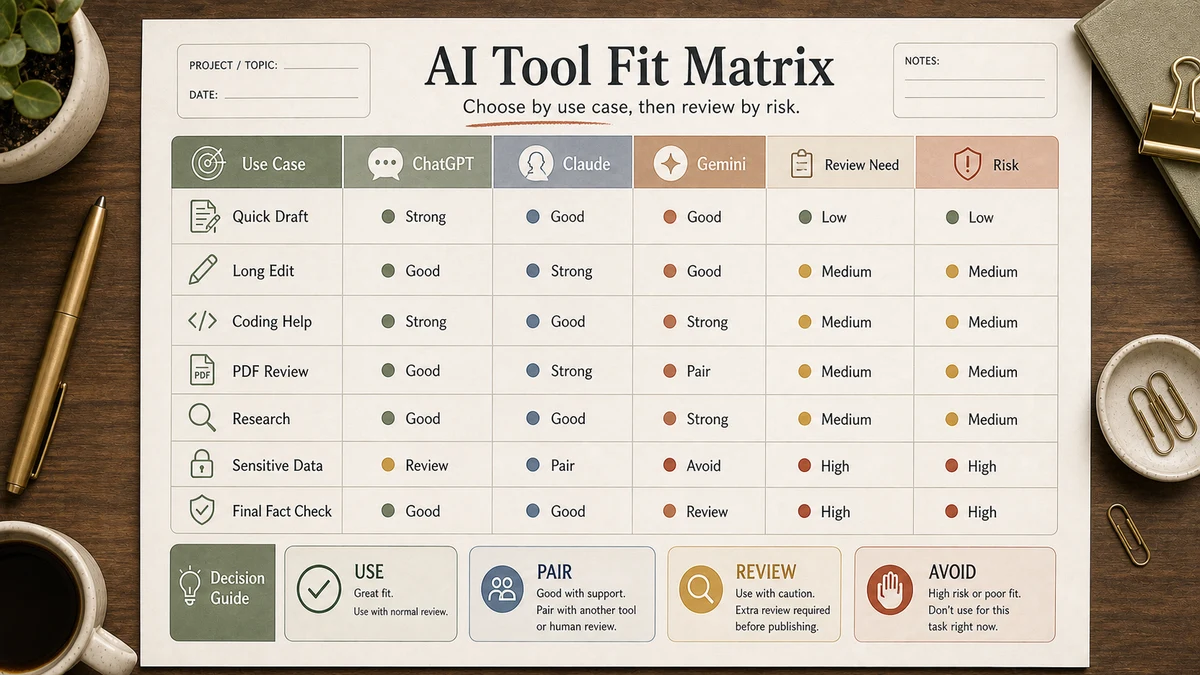
| Strength | Best at | Honest weakness |
|---|---|---|
| Claude (Anthropic) | Long-form writing, long-context analysis, structured editing | Daily message caps; sometimes overly cautious phrasing |
| ChatGPT (OpenAI) | Fast iteration, brainstorming, broader integrations, image generation | Output can drift toward marketing voice without explicit constraints |
| Gemini (Google) | Google Workspace integration and PDF/image input | Voice can feel more cautious; plan limits and feature availability can change |
Plan names, message caps, model access, and prices change often, so treat this as a paid-plan adoption decision rather than a fixed-price comparison. Before buying, open the current plan pages for ChatGPT, Claude, and Google AI plans. The buying question is simple: which plan removes enough review time, handoff friction, or tool-switching to justify the subscription?
Step-by-Step Workflow: Match the Tool to the Job
Long-form writing (blog posts, PRDs, ebooks)
Winner: Claude. The prose feels less marketing-y, the structural editing is sharper, and the long context lets you keep the entire outline in scope. Our blog writing workflow uses Claude for drafting and ChatGPT for ideation.
Quick iteration and brainstorming
Winner: ChatGPT. Faster turnaround per message, more flexible Custom GPTs ecosystem, and the conversation flow feels more natural for back-and-forth. When we're still figuring out what we want, ChatGPT's the first stop.
Coding and dev tasks
Winner: Claude (with ChatGPT a close second). Claude tends to follow long, layered instructions more reliably, which matters when you're asking for code that touches multiple files. ChatGPT's newer reasoning models close the gap. For specialized coding workflows, dedicated tools like Cursor or GitHub Copilot still beat both.
Research and synthesis
Winner: depends on speed vs depth. ChatGPT's built-in browsing is fast and cites sources. ChatGPT Search handles real-time research with citations natively. Claude does deeper one-shot synthesis when you paste source material in directly. Perplexity (not in this comparison) is also worth considering for research-heavy workflows.
Customer support drafts and reply triage
Winner: ChatGPT for the broader tool ecosystem (Zapier integrations, Custom GPTs for tone-matching). Claude works fine; the difference is integrations, not output quality. Always run customer-facing AI in drafts-only mode for the first 30 days — see our automation tier list for the rollout.
Summarization (meeting notes, long emails, reports)
Winner: Claude when the input is over 10,000 words; Gemini when the input includes PDFs or images alongside text. ChatGPT works fine for shorter material.
Tasks needing image or PDF input
Best fit: Gemini. In this comparison, Gemini is often the first tool to test when the work depends on PDFs, images, or Google Workspace context. Still, verify current file limits and feature availability before standardizing the workflow.
Working inside Google Docs / Sheets / Gmail
Winner: Gemini. The native Google Workspace integration is a real workflow difference, not just marketing. If your team lives in Google Docs, Gemini meets you where you are.
The Honest Take: Use Two of the Three
For most knowledge workers and small teams, the right answer is paid plans on two of these, used by job:
- Most teams: Claude (drafting, editing, long context) + ChatGPT (ideation, fast iteration, integrations)
- Heavy Google Workspace teams: Gemini (in-doc) + Claude (long-form drafts)
- Pure individual creators on a budget: Claude paid + ChatGPT free, or vice versa
Instead of budgeting from a fixed monthly number, open the current plan pages and decide which two workflows are worth paying for. If the second paid plan does not save review time, reduce rework, or remove a workflow handoff, stay on one paid plan plus a free account for comparison tests.
Pitfalls We've Actually Hit
- Standardized on ChatGPT and tried to write 2,500-word PRDs in one shot. Output drifted into marketing copy after section 4. Switched long-form drafting to Claude; ChatGPT stays for ideation. Lesson: the model fits the job, not the loyalty.
- Used Gemini's free tier for customer-facing automation. Worked fine until a region-locked feature failed silently for a customer in another country. Lesson: check region restrictions before committing for production work.
- Asked Claude for code that touches the database. The code looked clean but used a deprecated SQL syntax we hadn't mentioned. Now we always paste the relevant schema into the prompt. Lesson: even the best model can't guess your codebase — give it context.
Common Mistakes
- Picking based on benchmark scores. Benchmarks measure narrow tasks. Real work is messier. Test on your actual workflow.
- Using a free tier for production work. Free tiers throttle, gate features, and sometimes change behavior without notice. If a workflow matters, pay for the plan.
- Trying to make one tool do every job. The cost difference between one paid plan and two is small. The capability difference is large.
- Ignoring data-handling terms. Do not paste customer data, private documents, or unreleased product plans until you have read the data-use and privacy terms for the exact plan you chose. Start with official documentation such as OpenAI's publisher and developer FAQ, then check the matching policy page for your provider.
- Not testing the same prompt on two models. The fastest way to see which model fits a job is to run it on both and compare. Takes 10 minutes.
Copy-and-Paste Prompt: Run Your Own Model Test
You are helping me choose between ChatGPT, Claude, and Gemini for one recurring workflow.

Workflow: [describe the exact task]
Input material: [paste a real brief, document excerpt, ticket, or customer note]
Output needed: [draft, summary, code review, support reply, research synthesis]
Constraints: [voice, format, sources, word count, risk rules]

Return:
1. The finished output.
2. Assumptions you made.
3. Where you need human review.
4. One reason this model may be a poor fit for this workflow.
Run the same prompt in two tools with the same input. Score the output on cleanup time, factual risk, structure, and whether a teammate could use it without rewriting the voice. That gives you a buying decision tied to your actual work, not a generic model ranking.
Tool Alternatives (Beyond the Big 3)
| Tool | When to consider | Trade-off |
|---|---|---|
| Perplexity | Research-heavy workflows; real-time citations | Less powerful for long-form drafting |
| Mistral | European data residency requirements | Smaller ecosystem, fewer integrations |
| Llama (open weight) | Self-hosted needs; full data control | Significant ops overhead |
| Cursor / GitHub Copilot | Pure coding workflows | Specialized; not for general writing |
Example Input: Side-by-Side Test Brief
Use a real task you repeat every week, not a toy prompt. A good comparison brief includes the source material, desired output, voice rules, risk rules, and what "good enough to ship" means. For an SEO article workflow, the input might be: a 200-word product context block, a target keyword, three internal links, a banned-phrases list, and a request for a 250-word introduction.
Example Output: Model Selection Scorecard
The scorecard below is a sample artifact, not a benchmark claim. It shows how to compare model output in your own workflow without trusting our preferences blindly.
| Review criterion | What to inspect | Decision rule |
|---|---|---|
| Cleanup time | How many sentences need rewriting before publish? | Pick the tool that saves editing time, even if another sounds flashier. |
| Instruction fit | Did it follow format, source, and tone constraints? | Reject the model for this workflow if it ignores hard constraints twice. |
| Risk level | Did it invent facts, tool features, prices, or unsupported claims? | Use the safer model for customer-facing or SEO-sensitive drafts. |
| Workflow cost | Does the paid plan remove enough weekly review work? | Pay only when the saved review time is recurring, not occasional. |
Tested Workflow Notes
The strongest test is boring: same input, same constraints, same reviewer, same scorecard. We usually reject outputs that look impressive but require a second editorial pass to remove hype, unsupported certainty, or generic structure. That is why this article ranks the tools by recurring work type instead of declaring one permanent winner.
For implementation-heavy work, use the separate coding web apps comparison before you choose a default assistant for building, debugging, or reviewing front-end changes.
FAQ
Which is better, ChatGPT or Claude?
Claude tends to be stronger for long-form writing, structured editing, and tasks needing long context. ChatGPT tends to be stronger for fast iteration, brainstorming, image generation, and tool integrations. For most knowledge workers, the honest answer is to use both — each one for the jobs it's good at — and the cost difference between paying for one plan versus two is small relative to the capability gain.
Is Gemini better than ChatGPT?
For tasks involving PDFs, images, or Google Workspace integration, Gemini may be the better fit. For writing, brainstorming, and ideation, we would still test ChatGPT and Claude side by side. If cost is the deciding factor, compare the current official free and paid plan limits before choosing.
Which AI tool is best for writers?
Claude is often our first test for long-form prose because the output usually needs less voice editing and the structure tends to hold up across longer drafts. ChatGPT is still useful for ideation and short-form variants, so many writers should test both on the same brief.
Which AI tool is best for product managers?
Claude for PRDs, customer feedback synthesis, and any document over 1,000 words. ChatGPT for short-form (user stories, single tickets, quick rewrites). See our AI workflow for product managers guide for the prompt patterns that work.
Should I pay for all three?
Almost never. Two paid plans cover most recurring use cases for many teams. The third tier is only worth paying for if you have a specific workflow that genuinely needs it, such as deep Google Workspace use where copying material between tools creates real friction.
Final Recommendation
If you take only one thing from this comparison: choose by recurring workflow, not brand loyalty. Use Claude when long-form editing quality matters most, ChatGPT when iteration and integrations matter most, and Gemini when Google Workspace or multimodal input is the center of the job.
Run the same prompt across two tools on your most common task this week. Note which output you actually want to use after human review. That is your answer for that workflow. Recheck plan limits and model access before a team rollout, because the details will change faster than the underlying decision method.