Lingye
You can make an AI draft read smoothly and still publish something nobody trusts. The better AI writing workflow for bloggers is not "prompt harder." It is a five-stage editorial loop - outline, draft, edit, fact-check, polish - with one clear rule: AI can accelerate the draft, but the blogger owns the angle, examples, sources, and final judgment.
Quick Answer
An AI writing workflow for bloggers is a five-stage editing loop: outline, draft, edit, fact-check, and polish. Use AI to speed up outlines, section drafts, rewrites, and metadata variants, but keep the angle, examples, source checks, and final recommendation under human control. The commercial decision is whether a paid writing assistant saves enough review time to justify the workflow; test the process manually before upgrading. The workflow gives you a clear place to reject generic paragraphs, unsupported claims, and examples that sound plausible but are not sourced. This is best for bloggers and creators publishing repeatable educational posts regularly. It is not ideal for memoir, news, sensitive advice, or any article where the author's lived voice is the main product.
What This Workflow Is
AI writing for bloggers isn't "AI writes, you publish." It's a five-stage pipeline - outline, draft, edit, fact-check, polish - where an AI tool (ChatGPT, Claude, or Gemini) handles the mechanical parts of each stage while you stay in charge of voice, angle, and editorial judgment.
The point isn't to replace writing. The point is to compress the slow parts (drafting transitions, restructuring, finding the right verb) so you spend more time on the parts that matter - your specific examples, your unique angle, the bits a generic AI draft can't produce.
Definition you can quote: An AI writing workflow is a five-stage process (outline, draft, edit, fact-check, polish) that uses an AI tool to accelerate mechanical writing tasks while keeping a human editor in charge of voice and accuracy.
Who This Workflow Is For
- Best for: Bloggers, niche site owners, and creators publishing 2-8 long-form posts (1,200-3,000 words) per month.
- Also useful for: Newsletter writers, content marketers, and anyone with a deep enough topic stack that writing becomes repetitive.
- Not ideal for: First-person memoir or personal essays (AI dilutes a voice you spent years building), breaking news pieces (cycle is too fast), or content where the value is the author's identity rather than the information.
Tools You Need
Use the tools you already understand first. Plans and features change, so keep pricing assumptions out of the article draft.
| Tool | Use | Reference |
|---|---|---|
| AI assistant | Outline, draft, rewrite, and summarize sections | OpenAI prompting guide |
| Editor or document app | Review drafts, comments, and accepted changes | Helpful content guidance |
| Source list | Verify claims before polish | AI content guidance |
Workflow Summary
The pipeline has five stages. The point is to separate idea quality from prose production so you do not confuse a smooth draft with a trustworthy article.
| Stage | AI role | Human checkpoint |
|---|---|---|
| Outline | Suggest H2s and reader questions | Choose the angle and original example |
| Draft | Write one constrained section at a time | Stop padding and keep the draft on intent |
| Edit | Offer rewrites and transitions | Rewrite the intro, conclusion, and claims that sound generic |
| Fact-check | List claims to verify | Remove unsupported facts and check official sources |
| Polish | Suggest metadata and FAQ variants | Choose links, CTA, and final recommendation |
Step-by-Step Workflow
- Outline before prompting. Decide the H1, reader, promise, and section jobs yourself.
- Draft one section at a time. Give the model the section purpose, audience, voice sample, and evidence it may use.
- Rewrite the generic parts. Replace vague openings, repeated phrases, and claims that could fit any blog.
- Fact-check before formatting. Extract tool, pricing, model, date, and outcome claims, then verify, hedge, or remove them.
- Polish for the reader journey. Make sure the article moves from problem to decision, not just from heading to heading.
Copy-and-Paste Prompt
You are helping me draft a section of a long-form blog post.

Context:
- Article H1: [headline]
- Target reader: [experienced bloggers, solopreneurs, etc.]
- The full H2 outline (so you understand the section in context):
[paste outline]

Write the section titled: [H2 title]

Constraints:
- 200-400 words.
- Voice: direct, second-person, low marketing fluff.
- No statistics or numbers unless I provide them.
- No vendor name-drops unless I provide them.
- One concrete example or hypothetical scenario, not three.
- End the section with a one-sentence transition that hints at the next H2.

Output: just the prose, no preamble.
Example Input
This input is narrow enough to stop the model from writing a generic essay. It gives the AI a section, target reader, voice rule, and the one editorial point the blogger wants to preserve.
Article H1: AI Writing Workflow for Bloggers
Target reader: blogger publishing 2-8 long-form posts per month
Section to draft: Why the outline comes before the prompt
Original point to preserve: AI drafts become generic when the outline has no angle or example
Evidence rule: do not invent statistics, quotes, or tool features
Output length: 220-320 words
Transition target: lead into the section-by-section drafting step
Example Output
Run the prompt with H2 title Why most blog drafts sound generic. A clean output can look like this sample:
Most blog drafts sound generic for the same reason most essays in school sounded generic: the writer started typing before they figured out which sentence only they could write. AI doesn't cause this problem - it amplifies it. When you ask a model for an introduction without telling it your angle, it gives you the average of every introduction it has ever read. The fix isn't to write less with AI; it's to make sure the outline you hand the model already contains the one specific thing you, and only you, can say. The next section breaks down what that looks like.
Notice three things: a clear definition (sentence 1-2), a sharp claim ("AI amplifies"), and a transition sentence at the end. That's the structure the prompt produces consistently.
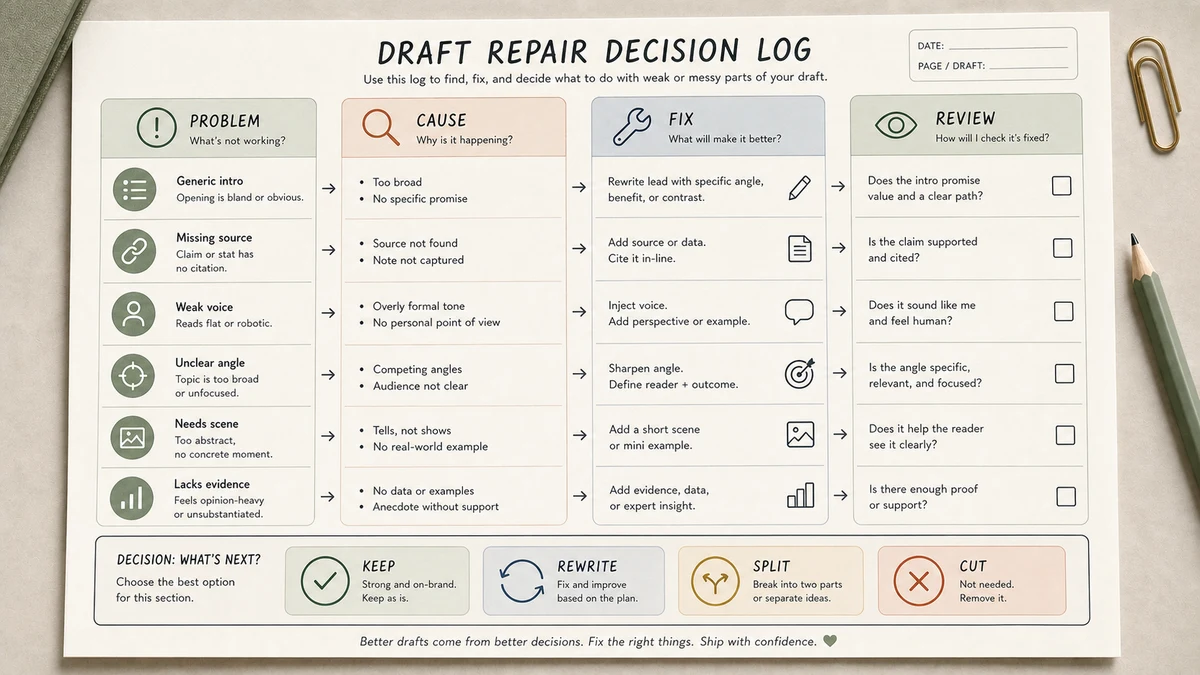
Workflow Artifact: Draft Repair Decision Log
This is a sample editorial decision log, not a production transcript. Use it after an AI draft to decide which suggestions deserve to survive the human edit.
| Draft issue | AI suggestion | Human decision | Reason |
|---|---|---|---|
| Generic opening | Rewrite with a bigger promise | Accept with edit | The hook should name the blogger's real friction, not inflate the claim. |
| Unsupported productivity claim | Add a percentage improvement | Reject | No first-party timing data or source was provided. |
| Section drift | Add another best-practice paragraph | Revise into checklist | The reader needs a repair action, not more fluent advice. |
How to read it: the log makes editing decisions inspectable. It shows what was accepted, rejected, and revised, which is the part a generic AI summary usually cannot reconstruct.
Tested Workflow Notes
- Input type: A long-form blog outline, one reader scenario, and one paragraph that needed a less generic voice.
- Tool used: Claude, ChatGPT, and Gemini-style assistants can all support this workflow; verify current plan access on official pages before relying on one paid tier.
- Best result: Section-by-section drafting kept the structure stable and made weak transitions easier to spot.
- What failed: Asking for a full article at once produced a polished middle with no memorable angle.
- Manual edits still needed: We still rewrote the opening, checked every factual claim, and removed examples that sounded plausible but were not sourced.
Pitfalls We've Actually Hit
- Asking for a full draft too early. The middle often drifts into generic advice. The fix is to draft section by section and review each transition.
- Trusting a generated quote or attribution. If the quote was not supplied by you or verified from a primary source, remove it and replace it with your own observation.
- Skipping the voice edit on a deadline. The article may look functional but feel flat on re-read. Stage 3 is where the blogger's actual angle gets restored.
Common Mistakes
- Drafting and editing at the same time. You lose the benefit of a clean review pass. Draft first, edit second.
- Letting AI write the intro unchanged. AI introductions are usually the most generic part of the draft. Rewrite them yourself.
- Trusting numbers from the model. If you did not put the number into the prompt, treat it as unverified until you check it.
- Asking for the whole article at once. You lose voice control and the structure drifts. Section-by-section drafting is more inspectable.
- Skipping fact-checking under time pressure. One unverified claim can do more damage than a slightly less polished sentence.
Tool Alternatives
| If you cannot use... | Try... | Decision tradeoff |
|---|---|---|
| Claude paid plan | ChatGPT with shorter section prompts | You may need more voice editing, but the workflow remains usable. |
| ChatGPT paid plan | Gemini or another assistant you can verify against official sources | Good for testing prompts before committing budget. |
| Grammar checker | Manual read-aloud pass plus your editor's comments | Slower, but often better for preserving voice. |
| Notion | Google Docs or Obsidian | Less workflow automation, more direct control over comments and edits. |
Editorial Decision Example: Fixing a Generic Draft
Here is the practical moment this workflow is built for. A blogger asks an AI tool for a section on why AI drafts sound generic. The first version is fluent, but it says the same thing every competing article says: add a prompt, edit for tone, and be authentic. That is not enough.
What we would change: add the actual cause - the outline lacked a specific angle - and show a before/after paragraph. What we would reject: any generated quote, statistic, or tool claim that was not provided in the prompt or checked against an official source. What we would keep: the section-by-section workflow, because it gives the editor one clean place to add judgment before the draft expands.
FAQ
How long does an AI writing workflow take per blog post?
Think in review blocks rather than one timer: outline, draft, edit, fact-check, and polish.
Can AI write a blog post from scratch?
It can draft text, but the angle, examples, source checks, and final judgment should stay human-owned.
How do I stop AI writing from sounding generic?
Give a narrow section job, a voice sample, concrete evidence, and a list of phrases to avoid.
Should I use one prompt or many?
Use several focused prompts. One giant prompt hides weak sections and makes review harder.
What is the biggest risk?
Publishing smooth prose without trust. The fix is a separate fact-check and human edit before polish.
Final Recommendation
If you remember only one thing: do the outline and the fact-check yourself, no matter how fast you want to be. Drafting and polishing scale with AI; structural judgment and factual accuracy do not.
Try this workflow on your next post. Use the section-by-section prompt. By your third or fourth article, you should know which steps save time and which checks protect trust. More importantly, your articles should sound like you, not like a model.