Lingye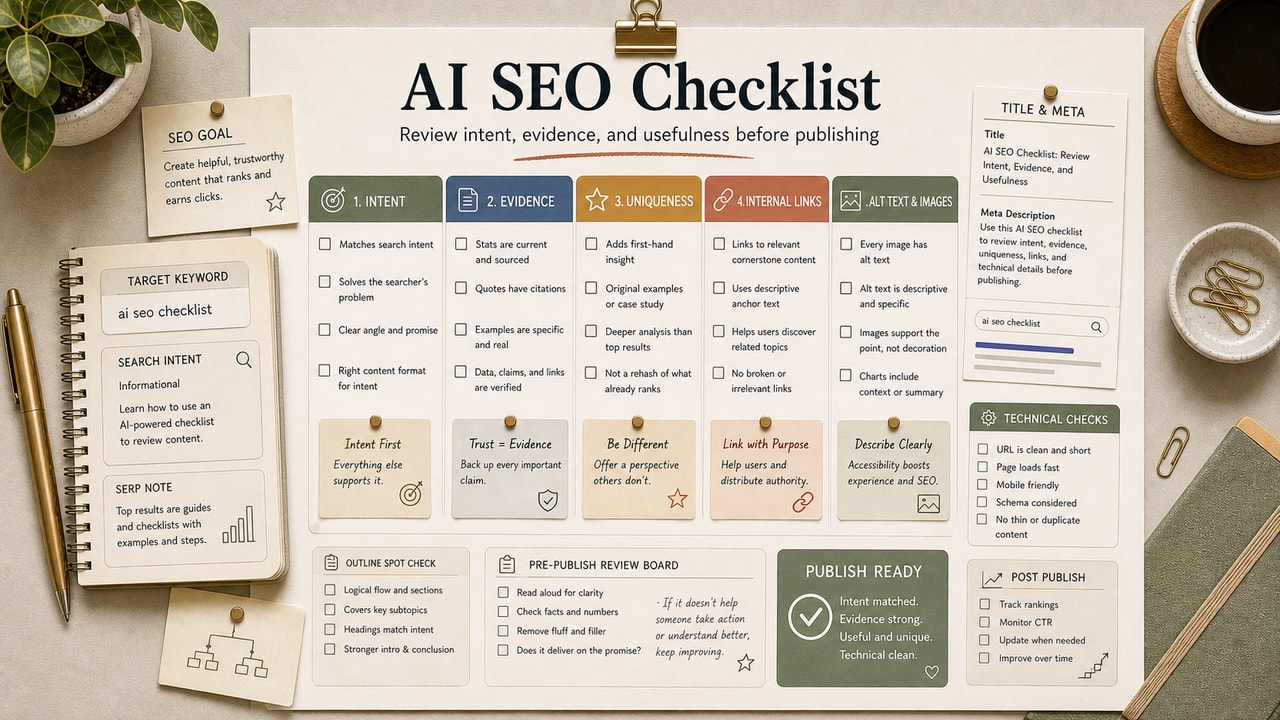
A long SEO checklist does not help if it turns into a bookmark nobody opens before publishing. The checklist below is the shorter version we use as an editorial gate: AI handles scanning and draft suggestions, while a human decides intent, claims, links, and final wording. That boundary matters because most low-value SEO content is not missing a tool. It is missing a decision about what the reader should be able to do after reading.
Quick Answer
An AI SEO checklist is a pre-publish review that uses AI for scanning, comparing, and rewriting suggestions while a human keeps control of intent, accuracy, voice, and final judgment. The useful order is: confirm search intent, lock the primary keyword, check headings, improve the meta title and description, add contextual internal links, draft FAQ answers, verify schema, review image alt text, and read the post once without AI. This workflow is most useful for bloggers and small teams that publish often enough to need a repeatable review, but not often enough to justify a heavy SEO operations stack. Do not automate the whole checklist. The highest-risk checks are the human ones: whether the post actually answers the query, whether claims are sourced or hedged, and whether the final article sounds trustworthy.
What This Workflow Is
This is an AI-assisted pre-publish SEO review for blog posts. It does not replace keyword research, editorial strategy, or final proofreading. It gives you a repeatable order for using ChatGPT, Claude, Gemini, or a similar tool to find gaps before a post goes live.
Definition you can quote: An AI SEO checklist is a human-reviewed publishing workflow where AI scans a draft for intent, keyword placement, metadata, links, FAQ coverage, schema risks, and claim language before an editor approves the final article.
Who This Workflow Is For
- Best for: solo bloggers, niche site owners, freelance writers, and small content teams that publish one to eight posts per month.
- Also useful for: SaaS founders and operators who maintain a blog without a full-time SEO editor.
- Not ideal for: newsrooms with real-time publishing needs, enterprise SEO teams with custom audit systems, or sites where legal/compliance review must own every claim.
Tools You Need
| Tool | Use it for | Decision note |
|---|---|---|
| ChatGPT | Fast metadata options, FAQ drafts, and claim scans | Use it for alternatives, not final approval |
| Claude | Longer draft review and internal-link suggestions | Good when you paste the article and sitemap together |
| Google Search Console | Real query data and old-post refresh signals | Use data from your site before trusting keyword guesses |
| Google Rich Results Test | Schema validation after publishing | Use the actual validator, not AI's opinion |
A paid AI plan is only worth considering if pre-publish review is a recurring bottleneck and your data policy allows pasting drafts into that tool. For a small archive, start with the tool you already use and spend more attention on editorial review.
Workflow Summary
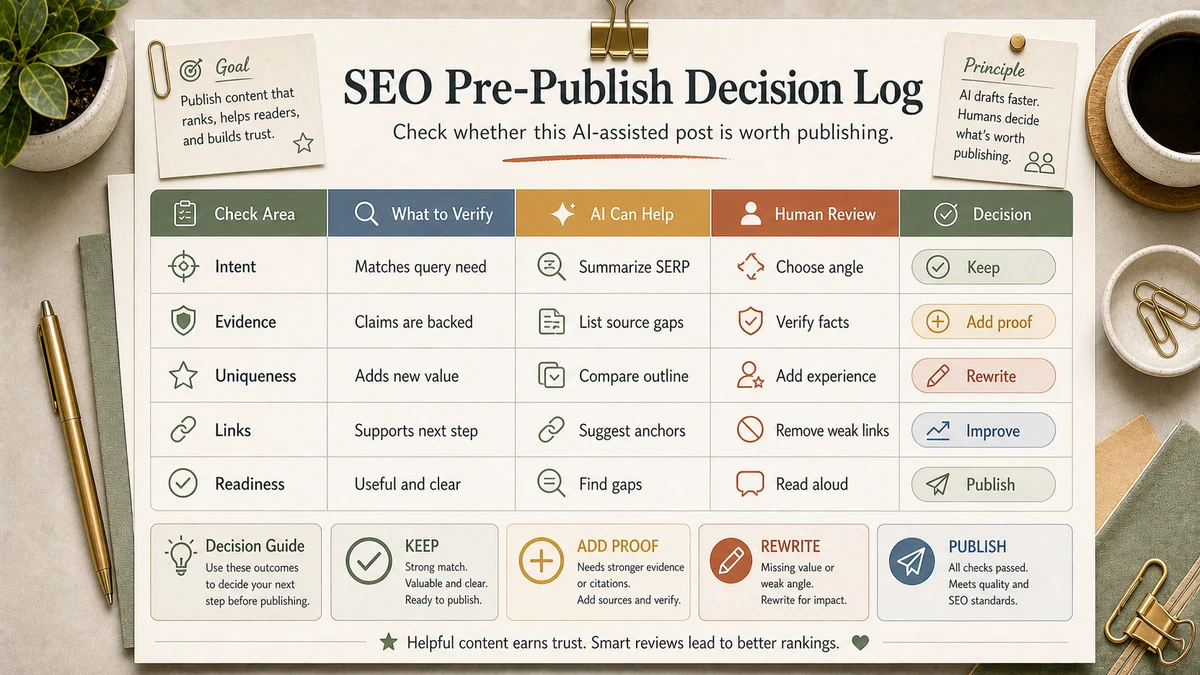
| Stage | AI can help with | Human must decide |
|---|---|---|
| Intent | Classify the likely search intent from the title and intro | Whether the article should be rewritten, split, or kept |
| Structure | Find missing H2s, repeated sections, and weak examples | Which sections serve the reader's decision |
| Metadata | Draft title and description variants | Which one is accurate and not clickbait |
| Trust | Flag unsupported numbers and broad claims | Whether to source, hedge, or remove the claim |
Step-by-Step Workflow
- Confirm search intent first. Paste the H1, slug, first paragraph, and target keyword into the model. Ask whether the draft is informational, commercial, transactional, or mixed. If the answer does not match the article you meant to write, fix the outline before touching metadata.
- Lock the primary keyword. Check the H1, URL slug, first paragraph, first relevant H2, meta title, and meta description. Let AI scan placement, but do not let it stuff the term into every heading.
- Use real query data when available. Pull Search Console queries for similar pages. Ask AI to group them by intent, then add only the gaps that match the article's original promise.
- Check headings for reader flow. A good heading sequence should show what the workflow is, who it is for, how to run it, examples, pitfalls, alternatives, FAQ, and a final recommendation.
- Rewrite metadata as options. Ask for several title and description variants, then choose the one that is accurate. Reject anything that promises a result the article cannot prove.
- Add contextual internal links. Give the model a sitemap excerpt and ask where a reader would naturally need the next workflow. Add only links that help the reading path, such as our AI SEO workflow or our old-post update workflow.
- Draft FAQ answers, then edit them down. FAQ should answer real reader objections, not repeat the article in different words.
- Verify schema and images. Use the Rich Results Test for schema and check every image alt text for plain, descriptive language.
- Run the trust pass last. Search for absolute claims, tool-price claims, model-performance claims, and made-up statistics. Source them, hedge them, or remove them.
- Read without AI. The final read should happen in the CMS preview or source text without asking the model to polish. This is where you catch voice drift.
Copy-and-Paste Prompt
You are an SEO editor reviewing a blog draft before publish. Do not rewrite the whole article.

Draft HTML: [paste draft]
Primary keyword: [paste keyword]
Sitemap excerpt: [paste relevant titles and slugs]
Known source notes: [paste sources or say none]

Return a numbered review:
1. Search intent match or mismatch.
2. Missing primary-keyword placements.
3. Heading gaps that hurt reader decisions.
4. Three meta title options and three meta description options.
5. Three internal-link opportunities with anchor text.
6. FAQ questions the article should answer.
7. Claims that need a source, hedge, or removal.
8. Final keep/change/reject recommendation.

Be specific. Quote the sentence that needs work.
Example Input
Draft: 1,650-word post about using ChatGPT for keyword clustering.
Primary keyword: chatgpt keyword clustering.
Sitemap excerpt: AI SEO workflow, AI keyword clustering, AI search intent analysis, old-post update workflow.
Known concern: the draft has weak internal links and a broad claim about saving time.
Example Output
Intent: Informational workflow. The middle section drifts into tool comparison, so either shorten it or link to a separate comparison post.
Keyword placement: Present in H1, slug, intro, and meta title. Missing from the first workflow H2.
Internal link: After the paragraph about grouping queries by intent, link to /posts/ai-search-intent-analysis with anchor text "AI search intent analysis workflow."
Claim risk: "This saves hours every week" needs a source or hedge. Replace with "This reduces manual sorting when the keyword set is small enough to review."
Tested Workflow Notes
The main editorial lesson is that the checklist works only when it creates a decision log. AI suggestions are easy to accept in bulk, but bulk acceptance is how generic SEO copy spreads across a site. We keep a short note for every changed post: what AI flagged, what we accepted, what we rejected, and why.
We also review links after the model suggests them. AI is good at finding semantically related posts; it is weaker at deciding whether the link helps the reader at that exact sentence. If the next article does not answer a real follow-up question, we leave the link out.
Workflow Artifact: SEO Pre-Publish Decision Log
| Check | AI flagged | Editorial decision |
|---|---|---|
| Intent | Draft mixes workflow and tool comparison | Keep workflow, move tool detail to a related link |
| Claim | Unsourced time-saving sentence | Remove number and describe the condition instead |
| Internal link | Suggested five links | Add three that match the reader path |
| FAQ | Generated broad questions | Rewrite around actual objections before publishing |
Uniqueness Pass: What Makes the Post Worth Publishing
The final pass is not another SEO checkbox. It is a usefulness test: if a reader can get the same advice from five generic AI answers, the post still needs a sharper contribution. We use this pass before publishing and again when refreshing older posts.
| If the draft only says... | Add this instead | Why it helps |
|---|---|---|
| "Use AI to check SEO" | A specific keep/change/reject decision from the review | Shows editorial judgment, not tool dependence |
| "Add internal links" | The reader question each link answers | Prevents forced links that exist only for SEO |
| "Improve the meta description" | The rejected version and why it was rejected | Teaches the reader how to decide, not just what to copy |
| "Verify claims" | A source, hedge, or removal decision | Strengthens trust and reduces thin AI-generated certainty |
If the uniqueness pass finds no decision the reader could reuse, we do not call the article ready. We either add a concrete example, remove a generic section, or link to a more specific workflow that handles the reader's next decision.
Pitfalls We've Actually Hit
- Letting AI optimize before intent is clear. Metadata polish cannot rescue a post that answers the wrong query.
- Accepting every internal link suggestion. Related is not the same as useful. Keep only links that answer the next reader question.
- Trusting AI on schema. Run the actual Rich Results Test after publish or after a major template change.
Common Mistakes
- Running the checklist out of order. Start with intent before keywords, metadata, or FAQ.
- Adding keyword variants as filler. Add variants only when they represent a real sub-question.
- Leaving unsupported numbers in the draft. Tool limits, pricing, percentages, and time savings need sources or hedges.
- Using AI to invent examples. Examples should come from the article's workflow, not from generic model output.
- Skipping the final human read. AI can miss voice drift, awkward transitions, and claims that sound too certain.
Tool Alternatives
| Need | Option | Trade-off |
|---|---|---|
| Fast checklist scan | ChatGPT | Good for short drafts and quick metadata variants |
| Long draft review | Claude | Useful when the article and sitemap excerpt are long |
| Query data | Google Search Console | Best source for what your own pages already surface for |
| Related workflow choice | ChatGPT vs Claude vs Gemini for SEO writing | Use a model comparison when the task type matters |
FAQ
How long should an AI SEO checklist take?
It depends on draft length, site complexity, and how many claims need checking. Treat the first few runs as setup time, then save the prompt and decision log format.
Can I automate the full checklist?
No. You can automate scans and reminders, but intent, claim judgment, link approval, and final voice review should stay human-owned.
Should I run this on old posts?
Yes, but prioritize posts with impressions, backlinks, revenue intent, or internal-link value. Refreshing every old post is usually less useful than improving the pages that already show signs of demand.
Does this help AI search results?
It can help indirectly because clear definitions, concise answers, and well-supported claims are easier for answer engines to cite. Do not write for answer engines at the expense of readers.
What is the most important item?
Search intent. If the article answers the wrong query, better metadata and more links only make the wrong article look more polished.
Final Recommendation
Use this checklist as an editorial control, not as an AI writing shortcut. The best output is a cleaner post plus a short record of what changed and why. That record is what keeps future updates from repeating the same mistakes.
For your next post, run the prompt once, accept only the changes you can defend, and keep the decision log beside the draft. If the review finds no intent problem, no unsupported claim, and three useful internal links, the checklist has done its job.