Lingye
A product manager does not need AI to sound strategic. The useful job is smaller and more concrete: turn a messy feature brief, feedback dump, or meeting note into a draft that engineering can review without guessing what you meant.
Quick Answer
An AI workflow for product managers should focus on draft compression, not product judgment. The seven useful tasks are PRD drafting from a constrained brief, user story generation, acceptance criteria, Jira or Linear ticket drafts, feedback theme clustering, feature comparison tables, and stakeholder updates. This workflow is best for PMs, founders, and PM-of-one roles that already have source material and need faster documentation. It is not for pricing strategy, roadmap prioritization, hiring, market entry, or cross-team politics where the tradeoffs are not in the input. The practical decision is to standardize a product context snippet, require open questions instead of invented details, and keep AI drafts outside the sprint until a human reviewer confirms scope, metrics, and engineering reality. Use the model as a drafting assistant, not a silent product owner.
This workflow keeps the original seven PM tasks, but tightens the guardrails. AI can compress the writing around PRDs, user stories, acceptance criteria, ticket drafts, feedback themes, comparison tables, and stakeholder updates. It should not decide the roadmap, invent metrics, or turn vague input into false certainty.
What This Workflow Is
An AI workflow for product managers is a small, deliberate set of writing-heavy PM tasks delegated to AI under tight constraints. It's not "AI does product management." It's "AI compresses the writing around the decisions humans are still making."
Definition you can quote: An AI workflow for product managers is a structured use of AI tools to draft PRDs, user stories, acceptance criteria, Jira tickets, feedback themes, and roadmap notes - always under explicit context constraints that match the product's real situation.
Who This Workflow Is For
- Best for: PMs, founders, and PM-of-one roles that already have a real brief or feedback source but need faster documentation.
- Also useful for: Technical PMs translating product decisions into engineering-ready stories, criteria, and ticket drafts.
- Not ideal for: Pricing strategy, market entry, hiring, roadmap prioritization, or political cross-team decisions where the tradeoffs are not in the source material.
- Reader decision: Use AI for draft compression only after the human product decision and source evidence are clear.
Tools You Need
Use tools where your team already works. Pricing, AI plan limits, and product features change often, so avoid hard-coding plan details into the PM workflow.
| Tool | Role | Decision note |
|---|---|---|
| Claude or another long-context assistant | PRD drafts, feedback synthesis, and long document cleanup | Useful when the source input is long, but still require source quote IDs for feedback themes. |
| ChatGPT or another fast assistant | User stories, acceptance criteria, ticket drafts, and rewrites | Useful for short iterations when the brief is already constrained. |
| Notion AI, Linear, Jira, or Coda | Where the final PM artifact lives | Keep the AI draft outside the sprint until a human reviews it. |
| A shared product context snippet | Audience, product domain, constraints, and sprint context | This is usually more important than switching models. |
Workflow Summary: 7 PM Tasks Where AI Helps
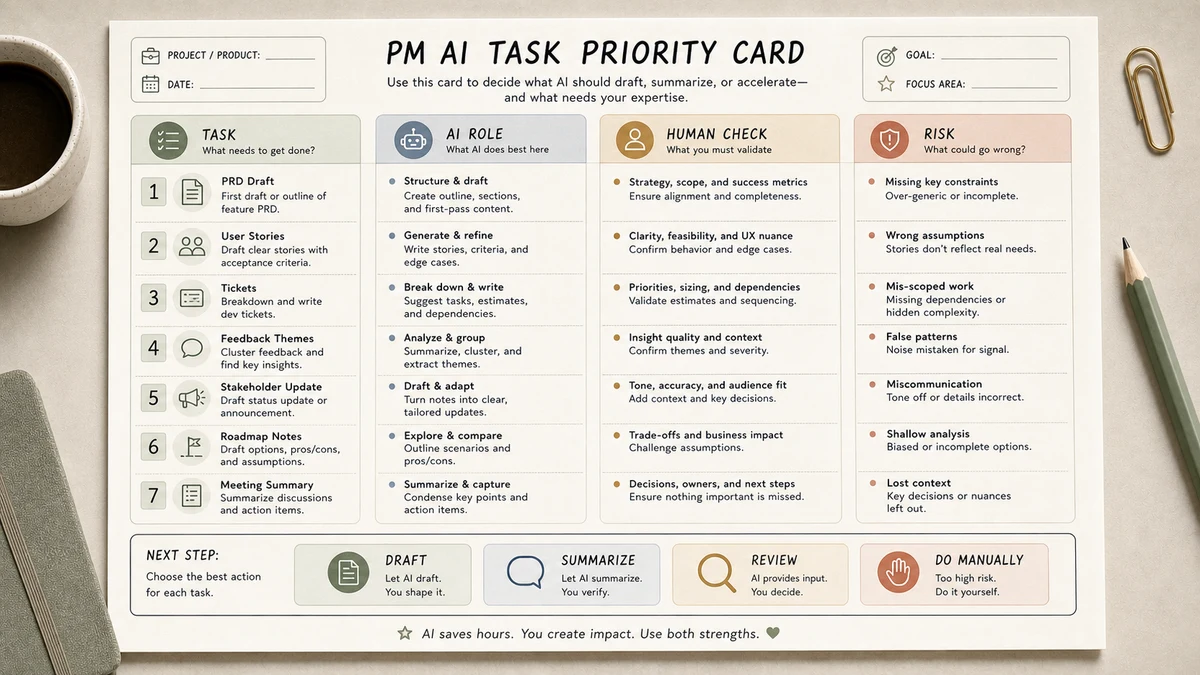
| # | Workflow | AI should do | Human must decide |
|---|---|---|---|
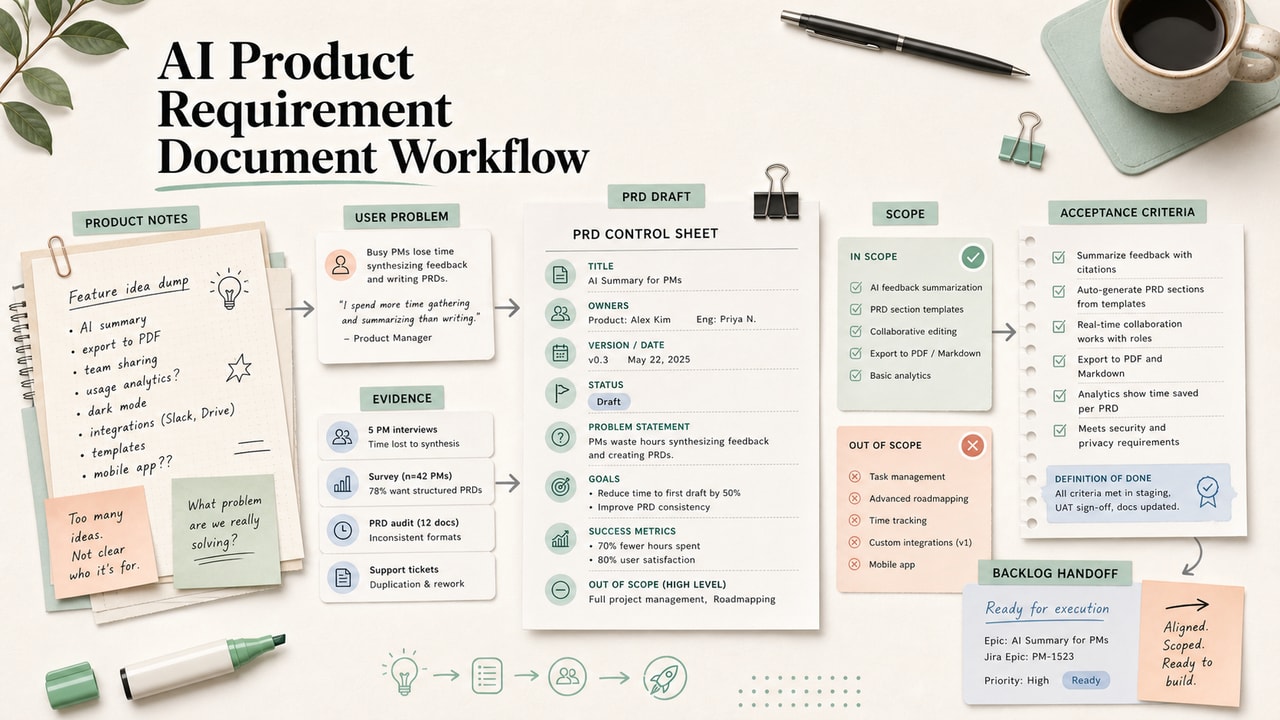
| 1 | PRD from a feature brief | Draft structure, goals, non-goals, stories, criteria, and open questions | Scope, tradeoffs, launch risk, and success metric validity |
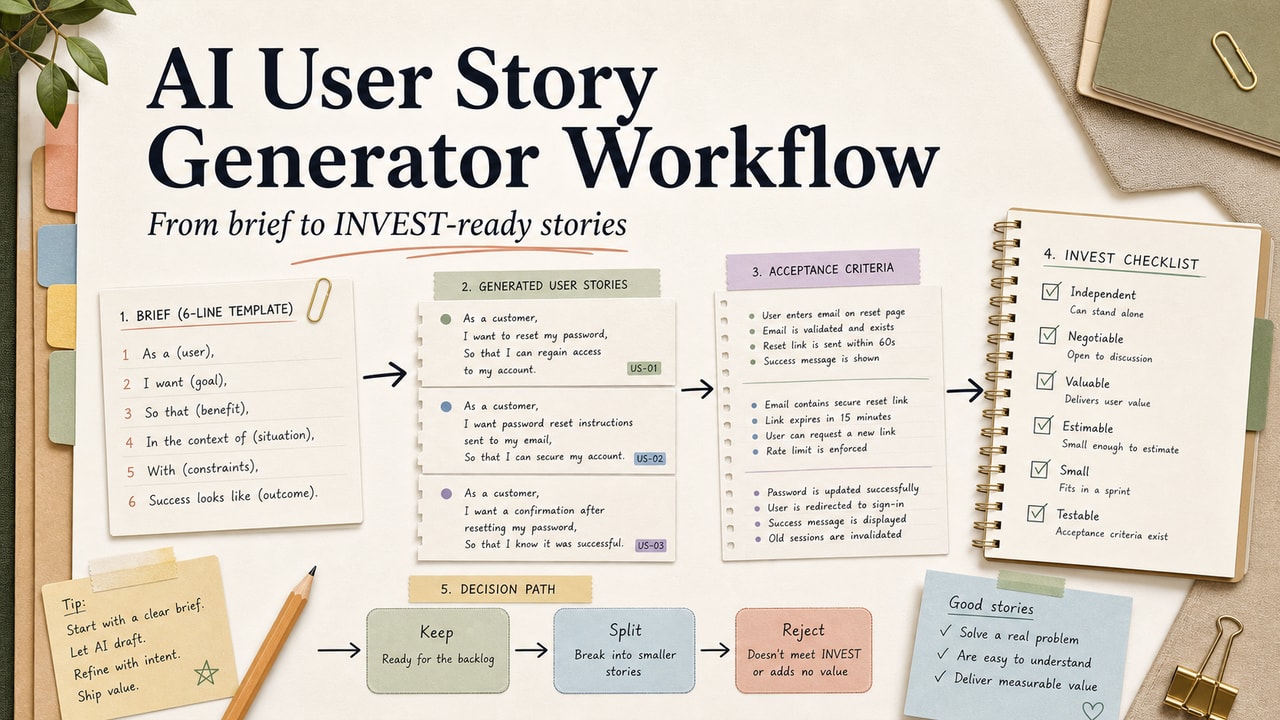
| 2 | User stories from requirements | Convert a brief into consistent story format | Whether each story reflects real user value |
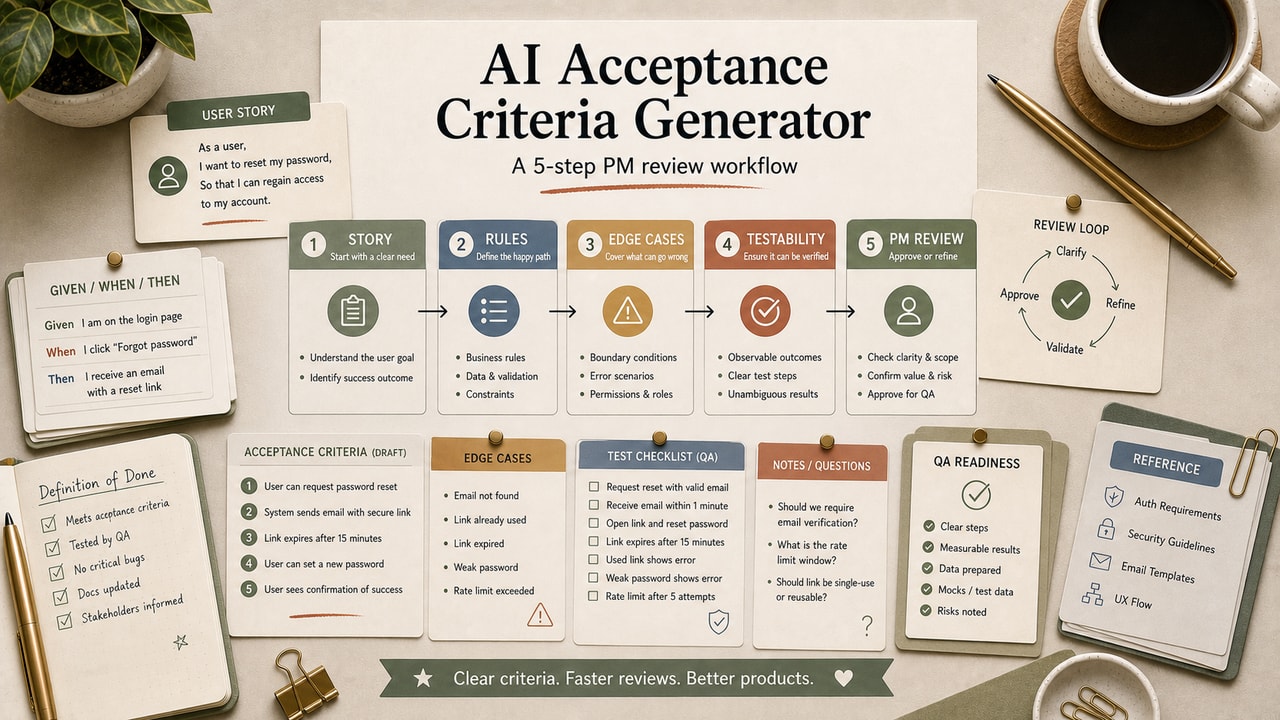
| 3 | Acceptance criteria | Write Given/When/Then candidates | Whether the system can actually behave that way |
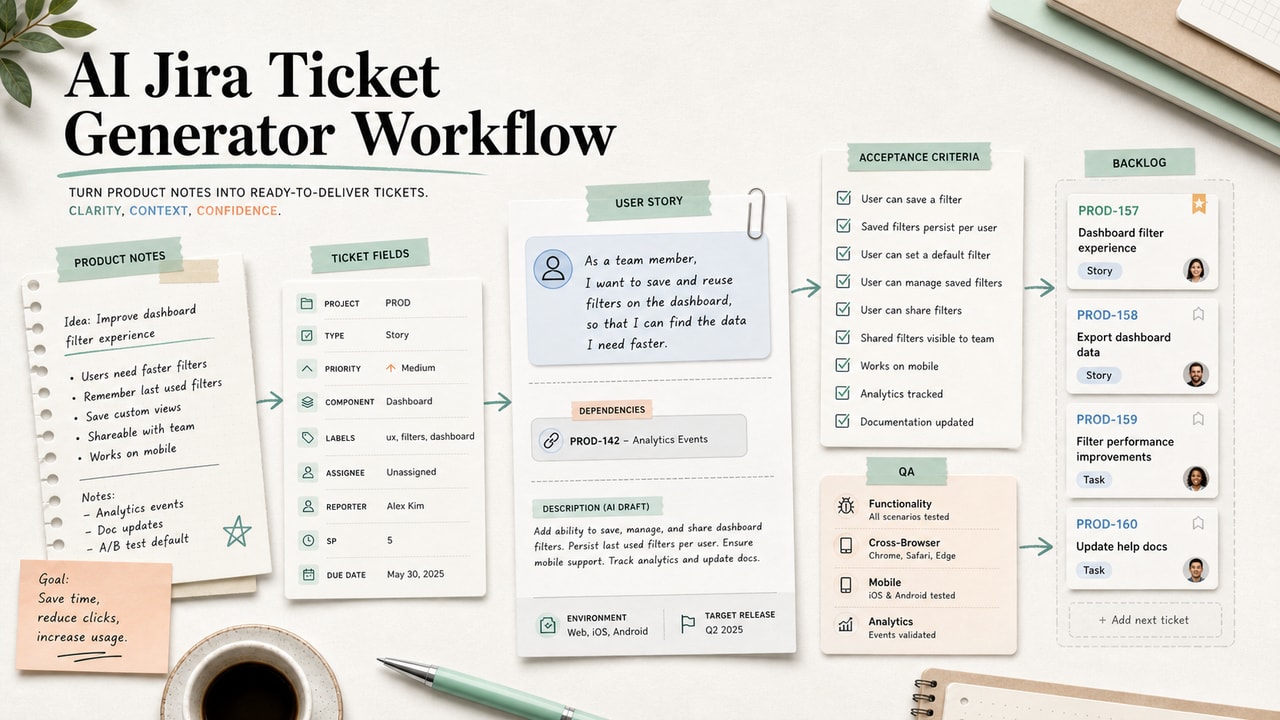
| 4 | Jira or Linear ticket drafts | Turn approved scope into clear implementation notes | Priority, sequencing, and sprint readiness |
| 5 | Customer feedback themes | Cluster quotes and label themes | Which themes are strategically important |
| 6 | Feature comparison tables | Structure known product differences | Which differences matter to the roadmap |
| 7 | Stakeholder updates | Rewrite the same decision for exec, engineering, and customer audiences | Tone, timing, and what not to disclose |
The pattern in all seven: AI formats and compresses writing around a decision. It does not earn the right to make the decision.
Step-by-Step Workflow: How a PRD Draft Runs
Step 1: Capture the brief in 7 lines
Before opening AI, write the problem, target user, current behavior, desired behavior, in-scope, out-of-scope, and success metric. Without this brief, the model fills gaps with generic product language.
Step 2: Add product context
Paste a short description of the product domain, audience, current sprint, and constraints above the brief. This context block is the quality lever PMs should standardize first.
Step 3: Ask for a constrained draft
Use the prompt below and require open questions instead of invented details. Unknown metrics should stay as placeholders, not model guesses.
Step 4: Edit for engineering reality
AI does not know the codebase, dependencies, rollout politics, or edge cases. Check every acceptance criterion against real product behavior before the draft enters planning.
Step 5: Review before sprint entry
Even a polished AI-drafted PRD is a draft. Keep it outside Jira, Linear, or the sprint board until the PM and engineering reviewer agree the scope is real.
Copy-and-Paste Prompt for PRDs
You are drafting a PRD for a product manager at MyLing Workflow Lab.

Product context:
[100-200 words on the product, audience, current sprint priorities]

Feature brief:
- Problem: [...]
- Target user: [...]
- Current behavior: [...]
- Desired behavior: [...]
- In scope: [...]
- Out of scope: [...]
- Success metric: [...]

Write a PRD with these sections only:
1. Summary (3 sentences)
2. Background (problem in user voice)
3. Goals (numbered, measurable)
4. Non-goals (numbered)
5. Proposed solution (one paragraph + bullet list)
6. User stories (5-7, format: As a [role], I want [action], so that [outcome])
7. Acceptance criteria (Given / When / Then format, 8-12 items)
8. Open questions (3-5, things engineering needs to confirm)

Constraints:
- Write in second-person where addressing teammates.
- Do not invent metrics. Use placeholders like [TBD with eng] if numbers are unknown.
- Do not add scope. If the brief is silent on something, list it under Open Questions.
Example Input
This is the kind of brief that keeps an AI PRD draft grounded. Notice that uncertain numbers stay marked as unknown.
Product context: SaaS billing settings for paid subscribers.
Problem: Users ask support when the next charge will happen.
Target user: active paid subscriber.
Current behavior: user must email support.
Desired behavior: user sees next billing date and amount in Settings > Billing.
In scope: display billing date, amount, and payment method status.
Out of scope: changing plans or updating payment methods.
Success metric: [TBD with support and eng]
Example Output (Acceptance Criteria Section)
Given a user with an active subscription, when they navigate to Settings > Billing, then they see their next billing date and the amount that will be charged.
Given a user whose payment method has expired, when they open Settings > Billing, then they see a warning banner with a "Update payment method" CTA above the fold.
Given a user clicks "Update payment method," when the modal opens, then Stripe Elements loads within 2 seconds; if it fails to load, an error state appears with a retry CTA.
Note the structure: Given/When/Then is something engineering can scan in 30 seconds. AI handles this format reliably; the only thing that needs human review is whether the criteria match real product behavior.
Tested Workflow Notes
- Input type: Feature briefs, customer quote clusters, acceptance-criteria drafts, and stakeholder update notes.
- Best result: AI output became useful when the brief named non-goals and asked for open questions instead of silent assumptions.
- What failed: Asking for a complete PRD from a vague idea produced confident sections that looked polished but did not match real scope.
- Manual review still needed: Metrics, engineering constraints, launch risk, user research interpretation, and priority calls.
Pitfalls We've Actually Hit
- Accepting generic acceptance criteria. Phrases like "within a reasonable time" sound acceptable until engineering asks what they mean. Replace them with a real threshold or [TBD with eng].
- Synthesizing feedback without quote IDs. A clean theme list is dangerous if every theme cannot point back to source feedback.
- Moving AI tickets straight into a sprint. The draft can be readable and still be wrong for dependencies, permissions, sequencing, or rollout risk.
Common Mistakes
- Using AI to make decisions. AI doesn't know what to build. Use it to write about decisions, not to make them.
- Skipping the product context. Without it, every output sounds like a B-school case study.
- Trusting feedback synthesis without source-quote IDs. Hallucinated themes are subtle and dangerous.
- Auto-creating Jira tickets from AI output. Tickets need engineering review before they enter the sprint.
- Letting AI invent metrics. If the brief doesn't have a number, the PRD shouldn't either - use [TBD with eng] placeholders.
Tool Alternatives
| If you can't use... | Try... | Trade-off |
|---|---|---|
| Claude paid | ChatGPT | Slightly shorter context, faster turnaround |
| ChatGPT paid | Gemini | Keep plan assumptions in a separate note; output style may need more review |
| Notion AI | Linear AI / Coda AI | Pick whichever lives where your team already works |
| Manual brief writing | Use a saved Notion brief template | Higher upfront cost, much higher PRD consistency |
Editorial Decision Example: Billing Status PRD Cleanup
Use this example as a review pattern, not as proof of a shipped feature. The source brief is a common one: subscribers want to see the next invoice date, amount, and payment-method status without emailing support.
What the AI draft can handle: summary, background, user stories, Given/When/Then acceptance criteria, and open questions. What the PM must still decide: whether payment-method updates are in scope, what success metric is legitimate, which edge cases matter, and whether support volume justifies the work.
The useful editorial move is deleting anything the brief did not support. If the draft invents a performance target, migration rule, or billing edge case, keep it as an open question until engineering confirms it.
Workflow Artifact: PRD Evidence Review Card
Sample artifact, not a production PRD or user-research record. Use this card after the AI draft and before the document enters Jira, Linear, or sprint planning.
| Draft claim | Evidence required | Decision |
|---|---|---|
| User problem | Support ticket, interview note, sales call quote, or analytics signal | Keep only if the source exists. |
| Success metric | Existing baseline or explicit [TBD with eng/support] | Do not let AI invent the number. |
| In-scope behavior | Confirmed product constraint or engineering note | Move unclear behavior to Open Questions. |
| Acceptance criterion | Real system state, edge case, and expected result | Rewrite vague criteria before sprint entry. |
| Roadmap implication | PM or leadership decision, not AI synthesis alone | Keep prioritization human. |
This card is deliberately boring. Its job is to catch unsupported certainty: the polished sentence, invented metric, or elegant acceptance criterion that the source material never earned.
FAQ
What is the most useful AI workflow for product managers?
Drafting a PRD from a constrained feature brief is usually the highest-value starting point. It turns a human decision into a structured artifact without pretending to decide the strategy. The brief must include scope, non-goals, and unknowns.
Should I use ChatGPT or Claude for PM work?
Use the assistant that fits the input length and your team's review habits. Long briefs and feedback dumps may benefit from a long-context model. Short ticket drafts and acceptance criteria often work well in a faster assistant. Do not hard-code plan details.
Will AI replace product managers?
No. AI can reduce documentation time, but it does not know your strategy, constraints, politics, user trust, or engineering tradeoffs. The PM job shifts toward better briefing, review, and decision quality.
How do I keep AI from inventing fake user research?
Require source quote IDs for every feedback theme and use [TBD] when the brief lacks evidence. If a number, quote, or user complaint was not in the input, treat it as unverified until someone checks the source.
Can AI help with roadmap planning?
AI can summarize inputs and cluster feedback, but it should not choose roadmap priority. Prioritization depends on strategy, timing, team capacity, revenue tradeoffs, and stakeholder context that the model usually cannot see.
Final Recommendation
If you take only one thing from this guide: build a 200-word "product context" snippet you paste at the top of every PM prompt. It is the single biggest quality lever, and it makes subsequent prompts more consistent.
Pick one workflow from the table above this week. Use the prompt structure. Time how long it takes versus your usual approach. By the third PRD you'll have your own variant of the prompt, and the time savings will compound across every sprint after that.