Lingye
A saved prompt is only valuable if you can explain why it works. Most prompt collections fail because they preserve finished wording but lose the task logic: role, goal, context, constraints, examples, and output format. The useful skill is not collecting more prompts; it is knowing which framework matches the job in front of you.
Quick Answer
AI prompt templates are useful when they preserve a reusable decision structure, not when they are copied as fixed scripts. The five frameworks worth keeping are Role + Goal + Constraints, Few-Shot Prompting, Reverse-Outline, Critic-Then-Rewrite, and Self-Check. Use the first for everyday tasks, few-shot for style or schemas, reverse-outline for long-form sections, critic-then-rewrite for editing, and self-check for fact-sensitive work. This workflow is best for bloggers, operators, and small teams that repeat similar AI tasks and need a prompt library they can maintain. It is not ideal for sensitive advice, high-stakes facts, unsupported product claims, or one-off creative exploration. The practical decision is whether to maintain a small framework library instead of collecting more prompts and screenshots without review notes.
This guide keeps the five reusable prompt templates, but treats them as decision tools rather than magic scripts. Use them when you need repeatable output, adapt the slots to your task, and reject any template that asks the model to invent facts, sources, or business context you did not provide.
What This Workflow Is
An AI prompt template workflow is a repeatable way to choose a prompt structure, fill its inputs, test the output, and save only the version that survives real editing. The goal is not to memorize perfect wording. The goal is to make your prompt reusable without making the output generic.
Who This Workflow Is For
- Best for: Bloggers, operators, product managers, and small teams who repeat the same writing, summarizing, editing, or classification tasks.
- Also useful for: Anyone building a prompt library for a team workflow.
- Not ideal for: One-off creative exploration, sensitive advice, or tasks where missing context could harm a customer, patient, client, or employee.
Tools You Need
| Tool or source | Use it for | Note |
|---|---|---|
| OpenAI prompt best practices | Clear instructions, context, and output shape | Use as a baseline for prompt hygiene. |
| Anthropic prompt engineering docs | Prompt iteration and model-specific behavior | Useful when working with Claude. |
| Google AI Studio | Testing prompts against Gemini-style models | Use official docs and current model access before standardizing. |
| Prompt library page | Store the final template, example input, and review notes | Save frameworks, not random screenshots. |
Workflow Summary
| Use case | Best framework | Human checkpoint |
|---|---|---|
| Everyday summary or rewrite | Role + Goal + Constraints | Check that the goal is single and specific. |
| Specific voice or schema | Few-Shot Prompting | Use examples you actually approve. |
| Long-form article sections | Reverse-Outline | Keep section context and transitions intact. |
| Improving weak prose | Critic-Then-Rewrite | Accept only critiques that make editorial sense. |
| Fact-sensitive output | Self-Check | Verify claims outside the model. |
Why Prompt Lists Don't Actually Work
A prompt list is a costume shop, not a tailoring studio. The prompts in those Twitter threads were built for someone else's task, on someone else's data, against someone else's tone constraints. Copy them and you usually get a result that needs more editing than if you had written the prompt yourself.
The fix is to learn the underlying shape rather than collect outfits. Once you can see a prompt's anatomy, every "new" prompt you encounter just becomes a slight variation of one of these five forms - and you can build your own in 30 seconds.
The Anatomy of a Working Prompt
Every reliable prompt has the same five organs. Some frameworks emphasize different ones, but if even one is missing, the model improvises - and improvising is where hallucinations and generic output come from.
| Element | What it answers | Common failure when missing |
|---|---|---|
| Role | Who is the model pretending to be? | Vague, generic voice. |
| Goal | What single outcome do you want? | Output is technically correct but useless. |
| Context | What does the model need to know? | The model fills the gap with assumptions. |
| Constraints | What must it NOT do? | Drift, padding, marketing fluff. |
| Output format | What shape should the response take? | You spend 10 minutes reformatting. |
Optional but useful extras: examples (few-shot), self-checks ("verify each claim before answering"), and a refusal clause ("if you don't have enough information, ask one clarifying question instead of guessing").
Step-by-Step Workflow
- Choose the one job the prompt should do.
- Pick the framework that matches the job.
- Fill role, goal, context, constraints, and output format.
- Run one small example before using it on real work.
- Save the prompt only if the edited output is better than starting from scratch.
Copy-and-Paste Prompt
Role: You are a [specific role] working on [domain].

Goal: [one concrete outcome]

Context:
- Audience: [who will read or use the output]
- Source material: [paste or summarize the input]
- Decision to support: [what the reader/user must decide]

Constraints:
- Do not invent facts, quotes, sources, prices, or product features.
- If context is missing, mark the output as needs_human_review.
- Keep the output in [tone/length].

Output format:
[table / bullets / JSON / draft section / checklist]
Example Input
Role: You are an editor for a workflow blog.
Goal: Turn rough notes into a 5-step checklist.
Audience: solo blogger choosing a repeatable AI writing process.
Source material: outline, draft, edit, fact-check, polish.
Decision to support: which steps can use AI and which require human review.
Constraints: no invented statistics; flag missing evidence.
Example Output
Checklist: 1. Write the outline manually. 2. Draft one section at a time. 3. Rewrite the intro and conclusion yourself. 4. Verify every factual claim. 5. Use AI for metadata variants, then choose the version that matches the article promise.
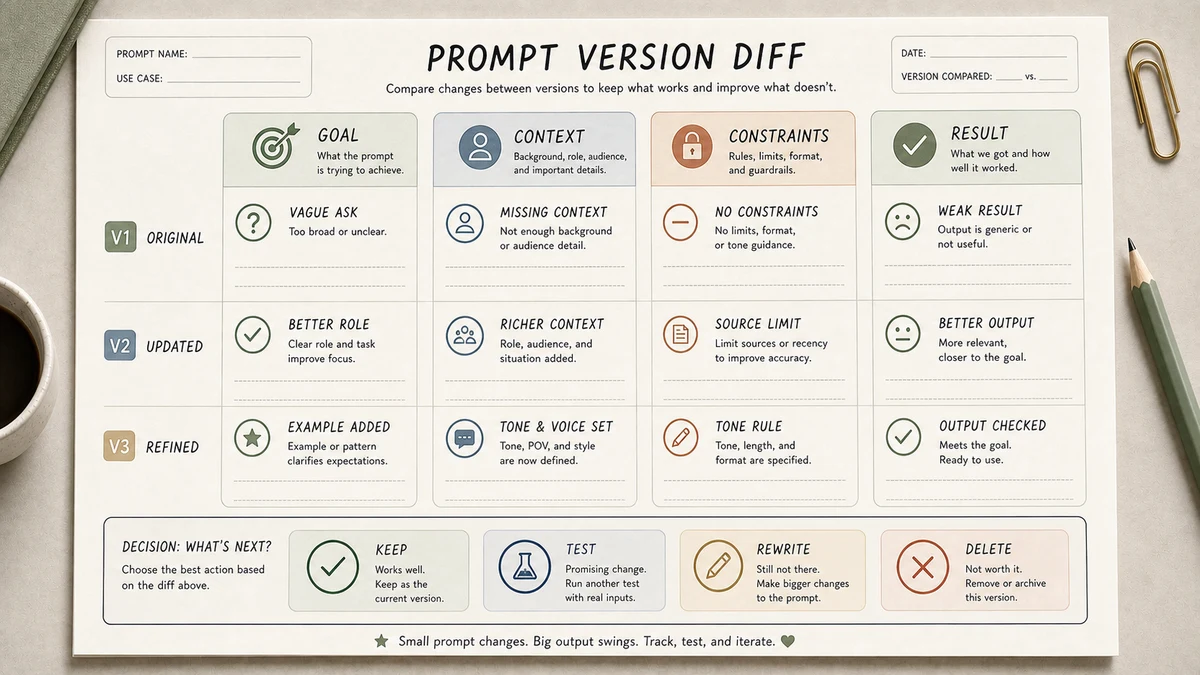
Workflow Artifact: Prompt Version Diff
This is a sample prompt revision artifact, not a production transcript. It shows how a weak saved prompt becomes a reusable template only after the missing context and review rule are visible.
| Version | Prompt fragment | Failure or improvement |
|---|---|---|
| V0 saved prompt | "Write a checklist for AI blog writing." | Too broad; no audience, source material, or review rule. |
| V1 structured prompt | "Role: workflow editor. Goal: turn rough notes into a 5-step checklist. Audience: solo blogger. Constraints: no invented stats; flag missing evidence." | Reusable because the job, reader, source, and guardrail are visible. |
| Keep/delete decision | Save V1 with one approved example output; delete V0. | The library stores a working structure, not a vague instruction. |
Framework 1: Role + Goal + Constraints (the everyday workhorse)
Use it for many daily prompts. Drafting, summarizing, classifying, rewriting. It's called a workhorse because it keeps showing up in practical workflows without needing a dramatic persona.
Role: You are a [role] who specializes in [domain].

Goal: [single specific outcome]

Context: [3-5 lines of relevant background]

Constraints:
- [hard rule]
- [tone or length rule]
- Do not invent statistics or product features.
- If a claim cannot be verified from the context, say "unknown".

Output format: [Markdown / JSON / specific schema]
Pitfall: writers tend to skip the constraints block because it feels redundant. It isn't. The single line "do not invent statistics" reduces one of the most common failure patterns in draft review: a polished answer that quietly adds unsupported facts.
Framework 2: Few-Shot Prompting (when you need a specific style)
Use examples when style or schema matters. Two good input-output examples usually beat a long tone description.
Here are 2 examples of the output style I want.
Example 1: [input] -> [approved output]
Example 2: [input] -> [approved output]
Now transform this new input in the same style: [new input]
Do not use examples you would not publish. A weak example teaches the model the wrong standard.
Framework 3: Reverse-Outline Prompting (for long-form structure)
Use reverse-outline prompting when the article structure matters. Give the model the full outline, then ask for one section only.
Full outline: [H1 + H2/H3 list]
Write only this section: [exact H2]
Previous section ends with: [sentence]
Next section starts with: [sentence]
Length: [range]. Do not preview later sections.
This keeps sections from drifting and gives the editor one clean decision point at a time.
Framework 4: Critic-Then-Rewrite (for quality)
Use two passes when quality matters. First ask for a diagnosis, then decide which criticism is worth applying.
Prompt 1: List the 5 weakest sentences and why they are weak.
Prompt 2: Rewrite the draft using only the critiques I approve.
The critique can be wrong, so keep editorial judgment in the loop.
Framework 5: Self-Check Prompts (for factual reliability)
Use self-check prompts to build a fact-checking shortlist. Ask the model to label claims by confidence, then verify important claims outside the model.
After your answer, add "Confidence Audit".
List factual claims as: supported by input, needs source check, or inference.
This does not prove a claim is true. It simply makes uncertainty easier to find.
How to Adapt These to Your Voice
Use three short voice samples from work you actually like. Put them above the prompt and add: Match the rhythm and word choice of these samples. Do not copy sentences. Three examples are usually enough; more examples can crowd out the task instructions.
Tested Workflow Notes
- Input type: Blog outlines, summary tasks, rewrite tasks, and structured extraction prompts.
- Tool used: ChatGPT, Claude, and Gemini-style assistants can all use the same framework shapes; official prompting docs are better anchors than viral prompt lists.
- Best result: Templates worked best when the context and output format were concrete.
- What failed: Saved prompts without examples produced polished but generic output.
- Manual edits still needed: We still had to verify facts, reject weak critiques, and adjust the final voice.
Pitfalls We've Actually Hit
- Saving wording instead of structure. The prompt looked reusable, but the hidden context was missing.
- Using examples we would not publish. Bad few-shot examples teach the model the wrong standard.
- Trusting self-check labels. A confidence audit helps find risk, but it does not replace source verification.
Common Mistakes
- Asking for too much in one prompt. Long, multi-job prompts invite padding and instruction drift. Break complex work into stages.
- Vague output format. "A list of suggestions" returns a different shape every time. Specify the exact table, bullets, JSON, or section format.
- Skipping the constraints block. One sentence ("don't invent statistics, don't add disclaimers") prevents a surprising amount of cleanup.
- Treating prompts as fixed scripts. A prompt is a template with slots. If you're running the exact same prompt across very different tasks, your slots are too narrow.
- Not saving the ones that work. When a prompt produces output you're happy with, save the structure and review notes the same day.
Editorial Decision Example: Cleaning Up a Prompt Library
When a prompt library gets too large, audit the structure instead of the title. Sort each prompt by job: summarize, rewrite, classify, outline, critique, or fact-check. Then map it to one of the five frameworks. If two prompts have the same structure and only different topic words, merge them.
What we would keep: a small set of named templates with example inputs and review notes. What we would delete: screenshots, dramatic persona prompts, and anything that depends on facts not included in the input. The value is the reusable decision rule, not the saved wording.
Tool Alternatives
| Alternative | Best for | Tradeoff |
|---|---|---|
| One universal prompt | Very simple personal workflows | Breaks down when task types differ. |
| Prompt library database | Teams with repeated workflows | Needs pruning or it becomes clutter. |
| Model-specific prompts | High-value production work | More maintenance when models change. |
| No template, just chat | Creative exploration | Poor repeatability for operations. |
FAQ
What is the most useful AI prompt framework for beginners?
Role + Goal + Constraints. It is simple enough for daily work and strict enough to stop vague outputs.
Are long prompts better than short prompts?
No. A shorter prompt with clear context, constraints, and output format usually beats a long prompt with several jobs.
Should I save prompts or frameworks?
Save frameworks. Wording gets stale, but a reusable structure helps you rebuild the prompt for each task.
How do I make AI prompts sound like me?
Add a small voice sample, name the audience, and ask the model to preserve rhythm instead of copying style mechanically.
What is the biggest prompt-template mistake?
Copying a finished prompt without knowing the hidden context. Audit the job, inputs, and review rule before reusing it.
Final Recommendation
If you take only one thing from this guide: delete your folder of saved prompts and replace it with these five frameworks plus three voice samples of your own writing. You'll get more done with less prompt-collection FOMO and produce output that actually sounds like you.
Try Framework 1 on your next AI task today. Time how long the result takes to clean up versus your usual prompts. Within a week you'll have your own variants of all five - which is the real point. The frameworks are the scaffolding; your version of each one is what makes the work yours.