Lingye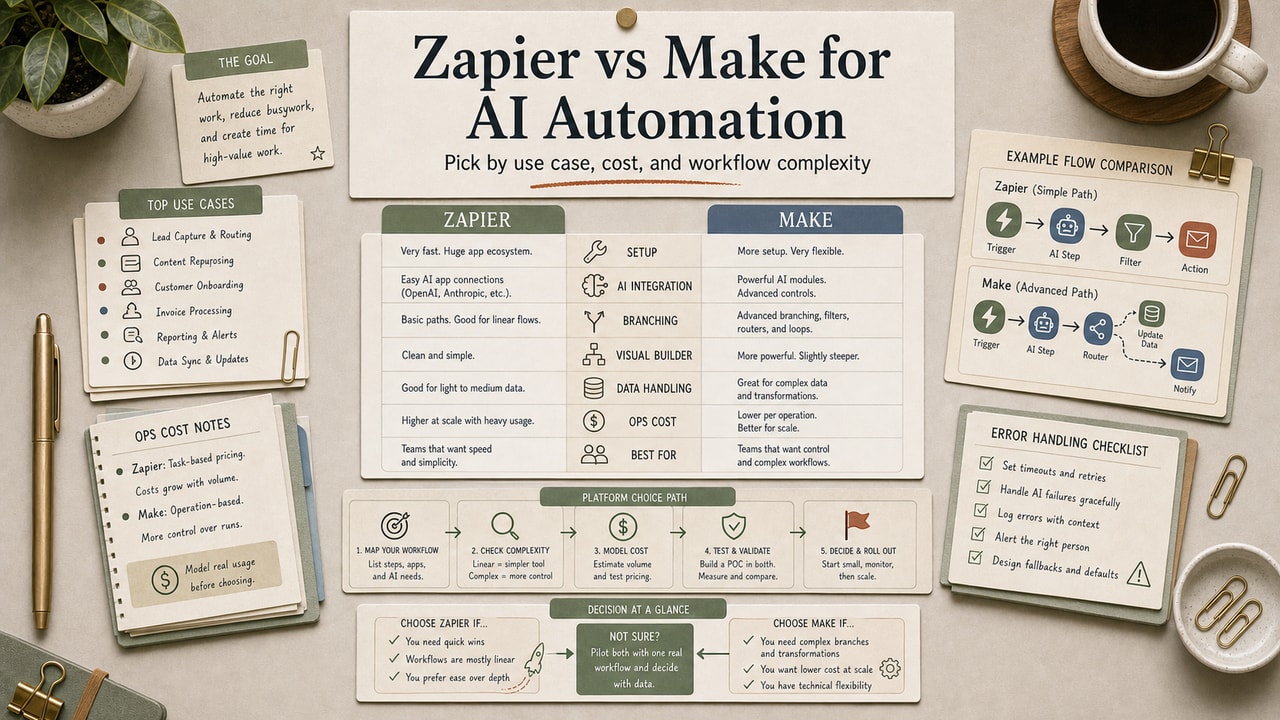
Zapier and Make do roughly the same thing: trigger something in App A, run AI in the middle, write the output to App B. The choice still matters — mostly for cost at scale and for what kinds of flows you can actually build. Below is the practical decision workflow we use: map the use case, estimate real run count, check current pricing, and decide who owns failures.
Quick Answer
Choose Zapier when the automation is simple, app coverage matters, and you need a non-technical teammate to ship the first version quickly. Choose Make when the workflow has branches, iterators, error routes, or enough monthly runs that per-operation pricing needs closer modeling. For AI automation, do not decide from brand preference alone: map the three workflows you expect to run most often, count the likely tasks or operations per run, test the AI prompt in isolation, then compare the current official pricing pages. Use roughly 1,000 to 1,500 monthly runs as a review trigger, not a universal break-even point. n8n only becomes the better choice when someone can own hosting, monitoring, and API failures. That keeps the choice tied to measurable workload instead of vendor preference.
What This Workflow Is
Two tools, six dimensions, one decision tree. We've run production automations on both for over a year. The differences below are the ones that show up in monthly bills and in flows you can or can't build, not the marketing copy each company puts on their homepage.
Definition you can quote: Zapier and Make are no-code workflow automation platforms that let non-developers connect SaaS apps and AI tools through visual interfaces; both work for AI automation, with different strengths.
Who This Workflow Is For
- Best for: Solopreneurs and small teams choosing a primary automation platform; existing users wondering whether to switch.
- Also useful for: Founders pricing out automation costs at projected scale.
- Not ideal for: Teams with engineering capacity who could self-host n8n; or enterprises with custom needs that demand purpose-built ETL platforms.
Tools You Need
| Tool or input | Why it matters | Decision note |
|---|---|---|
| Zapier pricing page | Confirms current task limits, paid tiers, and feature gates | Use it after estimating task count per flow run |
| Make pricing page | Confirms current operation bundles and scenario limits | Use it after estimating modules per flow run |
| Top 3 automation candidates | Prevents choosing based on a hypothetical workload | Compare real triggers, branches, retries, and AI calls |
| Failure-handling requirement | AI flows fail in ways simple SaaS syncs do not | Decide who gets alerted and what happens to partial outputs |
Workflow Summary
| Factor | Use Zapier | Use Make |
|---|---|---|
| Apps | Niche SaaS connectors matter most. | Core apps are covered; logic matters more. |
| Ease | A non-technical owner needs a linear build. | The owner can learn scenarios, routers, and iterators. |
| Logic | One AI step enriches, classifies, or writes. | AI output chooses a branch, retry, or review queue. |
| Cost | Run count is low; speed matters more. | Volume is growing; model cost per completed run. |
| Errors | Basic alerts and retries are enough. | You need error routes or fallback steps. |
The stable pattern is this: Zapier optimizes for breadth and ease; Make optimizes for visual logic and cost modeling. Pricing and plan limits change, so treat this table as a decision frame and verify the current numbers before buying.
Step-by-Step Workflow
Step 1: Map your first month of real runs
Start with the platform that lets you test real workflows with the least setup pain. A daily report, a lead-routing flow, and a content-repurposing flow are enough to reveal whether your work is mostly linear or branch-heavy.
If you cannot spend time learning Make's canvas, Zapier is a reasonable first test. Just track task count from day one so the convenience decision does not become an unnoticed cost decision.
Step 2: Use Zapier when speed and app coverage matter
Pick Zapier for simple, linear flows. If your stack includes niche SaaS tools, Zapier's connector breadth can reduce setup work. The trade-off is that you should watch task count and error visibility once the workflow runs often.
Step 3: Re-check when volume becomes visible
Rebuild the highest-volume flow in Make before upgrading blindly. Once the same automation runs often enough to affect the bill, compare cost per completed workflow run instead of comparing headline task or operation bundles.
Step 4: Use Make when branching logic matters
Pick Make for branch-heavy AI workflows. If an AI output decides the next path, review queue, retry, or fallback action, Make's visual scenario model is usually easier to inspect than a long linear automation.
Step 5: Consider n8n only when someone owns operations
Do not choose n8n only because it can lower platform fees. Self-hosting shifts work to maintenance, monitoring, credentials, backups, and uptime. It is a good option only when a named person owns those jobs.
Copy-and-Paste Prompt
You are helping me choose between Zapier, Make, and n8n for AI automation.

# Workflows I expect to run
[paste 3 workflows with trigger, AI step, destination, and expected monthly runs]

# Constraints
- Technical owner: [none / part-time / engineer]
- Error handling needed: [basic alert / retry / branch / human review]
- Apps involved: [list SaaS tools]
- Current budget comfort: [monthly range]

Compare the options by:
1. setup speed
2. connector fit
3. branching/error handling
4. estimated task or operation count per completed workflow run
5. maintenance risk
6. when I should re-check pricing

Do not guess current plan prices. Tell me which official pricing pages to verify before paying.
Example Input
Workflow A: new lead form -> AI qualifies lead -> CRM update -> Slack alert; 300 runs/month.
Workflow B: blog draft -> AI creates social variants -> human review queue; 80 runs/month.
Workflow C: support email -> AI category -> route urgent cases; 600 runs/month.
Constraint: no engineer owns uptime; errors must go to Slack with enough context to retry manually.
Example Output
| Workflow | Likely first choice | Reason | Review trigger |
|---|---|---|---|
| Lead qualification | Zapier | Linear flow, fast CRM connector setup | Re-check if qualification branches multiply |
| Social variant review | Make | Branching and review queues are easier to model visually | Re-check if the scenario becomes hard to monitor |
| Support routing | Make or n8n | Error handling and fallback paths matter more than setup speed | Use n8n only with a named technical owner |
Pricing Reality: Check the Current Pages
Do not treat any comparison article as the source of truth for plan limits. Both vendors can change task bundles, operation bundles, AI features, and free-tier rules. Use the official Zapier pricing and Make pricing pages before committing.
- Low volume: choose the tool that lets you ship and observe real runs with the least setup pain.
- Growing volume: compare cost per completed workflow run, not raw tasks versus operations.
- High complexity: include maintenance time, monitoring, and error recovery in the cost model.
Our editorial rule: review the platform decision once a workflow is frequent enough that one extra step, retry, or AI call changes the monthly bill.
What Counts as One Operation?
This trips everyone up because the platforms do not count work in identical ways.
- Zapier task: generally a successful action step that does work.
- Make operation: generally a module execution, including logic and routing modules depending on the scenario.
Do not compare raw quotas. Compare cost per completed workflow run after you estimate trigger count, action count, AI calls, retries, and failure handling. Then verify the estimate against the current official billing pages.
Pitfalls We've Actually Hit
- Started on Zapier, then outgrew the low-volume plan faster than expected. The mistake was not choosing Zapier; the mistake was failing to track task count until the bill forced the review. Lesson: set a review trigger before the third upgrade.
- Built a 12-step Zap with no error handling. One step silently failed for two days; we noticed only when downstream Slack alerts stopped. Now every important Zap has a webhook to a monitoring channel. Lesson: error visibility is your responsibility, not the platform's.
- Tried to learn Make right before a deadline. Bad idea. The visual canvas is learnable, but routers and iterators need quiet testing before they carry business-critical work. Lesson: budget practice time before migration week.
Common Mistakes
- Comparing raw task/op counts. Different definitions; compare per-flow cost.
- Starting on the wrong tier. Use a monthly or trial period long enough to observe real run counts before paying annually.
- Ignoring error handling. Silent failures are worse than loud ones.
- Not testing the AI step in isolation. Test the prompt by itself before wiring it into a 7-step flow.
- Locking into annual plans before validating. Use monthly for the first 90 days.
Tool Alternatives
| If you can't use… | Try… | Trade-off |
|---|---|---|
| Zapier or Make | n8n self-hosted | Potentially lower software fees; requires uptime and maintenance ownership |
| n8n self-hosted | n8n Cloud | Hosted version; less server work but still needs monitoring |
| Either platform | Direct API code (Python / Node) | Maximum flexibility; engineering overhead |
| Either for AI specifically | ChatGPT projects / Claude Projects | Simpler for prompt-only use; not a full workflow automation layer |
Tested Workflow Notes
The most useful comparison test is not a feature checklist; it is rebuilding one real AI flow in both tools. Pick a workflow with a trigger, one AI step, one destination, and one failure path. If the flow is linear and a teammate can understand it at a glance, Zapier often wins the first build. If the flow branches after the AI output, Make usually becomes easier to inspect and repair.
Our editorial migration rule is conservative: do not rebuild the whole stack because a spreadsheet says another platform is cheaper. Rebuild the highest-volume or most failure-prone workflow first, run it for a billing cycle, and only then move the rest.
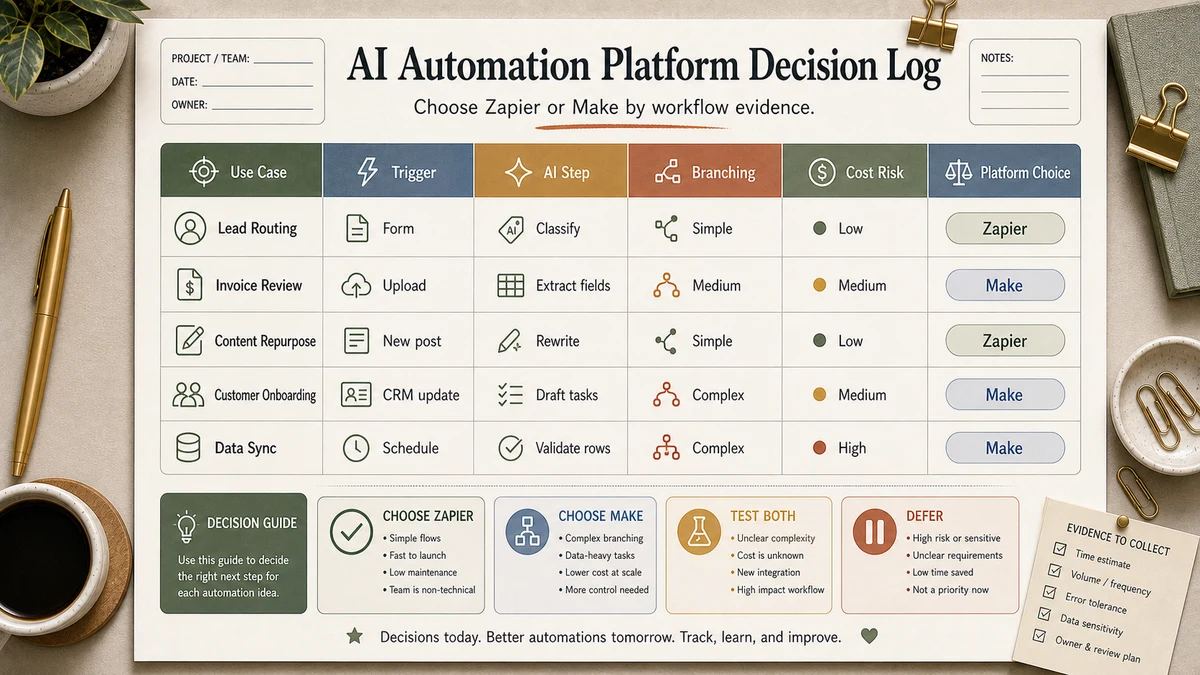
Workflow Artifact: Platform Decision Log
| Question | Zapier signal | Make signal | Decision action |
|---|---|---|---|
| Can a non-technical teammate debug it? | Yes, linear steps are clear | Only if they understand the scenario canvas | Choose the tool the owner can repair |
| Does the AI output branch the workflow? | Paths may be enough for simple cases | Routers make branches easier to inspect | Prototype the branch before paying annually |
| Will retries or partial failures matter? | Basic alerts may be enough | Error handlers can be designed into the scenario | Write the failure path before launch |
| Is cost the main pressure? | Model tasks per completed run | Model operations per completed run | Compare against current official pricing pages |
FAQ
Zapier or Make: which one is better for AI automation?
Make is usually better for AI automations with branching logic, review queues, or high enough volume that per-run cost matters. Zapier is usually better for low-friction setup, broad app coverage, and linear flows. Most small teams should start with the tool that gets a real test live, then re-check once usage data replaces guesses.
Is Make harder to learn than Zapier?
Yes, usually. Zapier is easier for linear flows because the mental model is close to a checklist. Make asks you to understand a canvas, routers, iterators, and scenario-level debugging. The extra learning time is worth it only when the workflow complexity or run volume justifies it.
What's the cheapest no-code AI automation option?
The cheapest option depends on current plan limits, run count, and who owns maintenance. For low volume, use the lowest-commitment plan that lets you test real workflows. For high volume, n8n can reduce software fees, but you become responsible for uptime, updates, credentials, and monitoring.
Can I switch from Zapier to Make later?
Yes, but assume you will rebuild and retest important flows manually. The practical path is gradual: build new flows in Make, leave stable Zaps alone until they need maintenance, then port the highest-volume or most failure-prone workflows first.
Do Zapier and Make work with ChatGPT and Claude?
Both platforms support common AI integrations and generic HTTP requests, but connector names and feature depth can change. Setup is often similar for a simple AI call; the difference shows up later in branching, retries, review queues, and cost per completed workflow run.
Final Recommendation
If you take only one thing from this comparison: make the paid-plan decision from observed workflow runs, not from vendor preference. Start with the tool that gets a real test live, then re-check once you know task count, operation count, error paths, and ownership.
Run your top three automations on the lowest-commitment setup that fits the test. Track completed runs, failed runs, AI calls, and manual repairs. By month two you should have enough evidence to commit, switch, or stay lightweight.