Lingye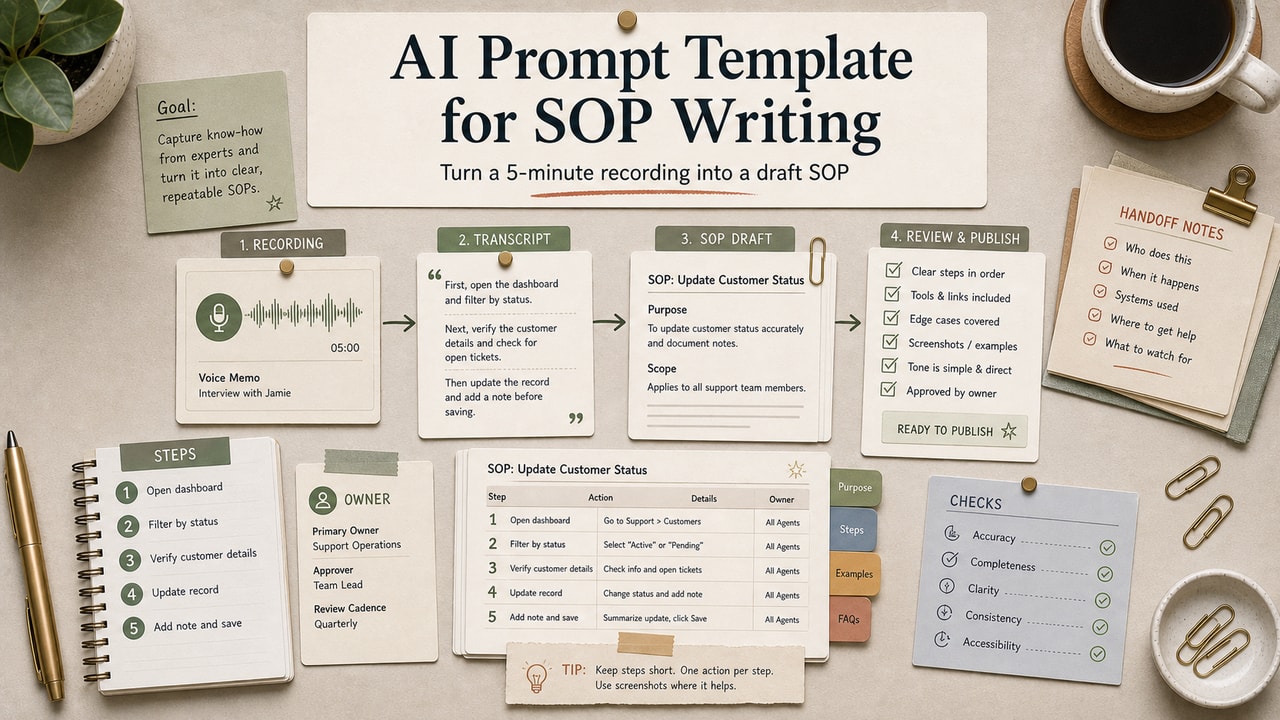
You've been meaning to document your team's processes for six months and the SOP folder is still a graveyard of half-written Google Docs. We've been there. The fix isn't more discipline — it's a prompt that turns a 5-minute recording or a 10-minute brain dump into a draft SOP you only have to edit, not write from scratch. Below is the exact template we use, plus the inputs that actually make it work.
Quick Answer
The most reliable AI prompt template for SOP writing starts from raw process material, not a topic name. Record a short Loom, paste a transcript or bullet dump into the prompt, list the tools used, and name the failure modes that usually break the task. The prompt should return a numbered SOP with purpose, owner, trigger, prerequisites, steps, common mistakes, escalation rules, and success criteria. The editorial rule is simple: AI may structure the draft, but a human must verify every action, tool name, access level, and edge case before the SOP becomes team documentation. This workflow is most useful when you already know the task but keep postponing the documentation. It is not a shortcut for regulated, safety-critical, or unfamiliar procedures.
What This Workflow Is
This prompt converts unstructured raw material (Loom transcript, voice memo, your own bullet notes) into a structured SOP with consistent sections — purpose, tools, prerequisites, numbered steps, common mistakes, escalation. The structure is non-negotiable; it's what makes SOPs scannable in week 12 instead of unreadable.
Definition you can quote: An SOP (Standard Operating Procedure) is a documented sequence of steps that lets a different person complete a task to the same standard, every time. AI can draft the structure; humans must verify the steps actually match reality.
Who This Workflow Is For
- Best for: Solopreneurs and small teams (1–10 people) who do repeatable tasks but never have time to write them down.
- Also useful for: Founders prepping to hire (clear SOPs reduce onboarding time meaningfully).
- Not ideal for: Highly specialized technical procedures where every step has compliance implications — those need a domain expert, not AI assistance.
Tools You Need
| Input | Why it matters | How to capture |
|---|---|---|
| Raw process material | Without it, AI invents generic steps | Record a Loom doing the task, or talk through it for 10 min |
| Tools used | Anchors the SOP in your actual stack | Quick list: "Notion, Stripe, Gmail, Slack" |
| Common failure modes | Turns a generic doc into a useful one | Think of last 2 times this task went wrong |
If you skip raw material, you get a generic SOP that sounds polished but cannot be trusted. Always feed real material in, then verify every access step and edge case before publishing it to your team wiki.
Workflow Summary
| Phase | Human job | AI job |
|---|---|---|
| Capture | Record the task, tools, owner, and known failure modes | Do nothing yet; the source material comes first |
| Draft | Paste the transcript and constraints into the prompt | Turn messy notes into a structured SOP draft |
| Review | Verify every step, access level, link, and exception path | Flag ambiguity instead of guessing |
| Cold test | Ask a new runner to use the SOP without side chat | Help rewrite stuck steps after the test |
Step-by-Step Workflow
Step 1: Capture raw material (5–10 minutes)
Pick the easiest format for you: record a Loom while doing the task once, dictate to a voice memo, or type bullet points. Don't overthink it; the AI will impose structure later. Don't skip this step — it is the entire workflow.
Step 2: Get a transcript if you used voice
Loom and voice memo apps both have built-in transcription. Or paste audio into a tool like Otter.ai. The transcript doesn't need to be clean.
Step 3: Run the prompt below
Paste the transcript or notes into Claude or ChatGPT with the SOP prompt. Get the first draft.
Step 4: Edit for accuracy
Read every step and ask: does this match what I actually do? AI will sometimes infer steps that aren't in your input — strip them. Add anything the AI missed.
Step 5: Have someone else run the SOP cold
The fastest way to find SOP gaps is to hand it to a teammate (or a freelancer) and let them try the task without your help. Their stuck points are your gaps.
Example Input
Use a rough input like this instead of asking for a generic SOP:
Raw material: Transcript from a screen recording where I add a new freelance editor to Notion, Slack, Gmail, and our contract folder.
Tools used: Notion, Slack, Gmail, HelloSign, billing tracker.
Failure modes: wrong Slack access level, outdated welcome-doc link, missing billing tracker row, unclear owner for the first assignment.
Human review needed: confirm the current private channel name and the active welcome-doc URL.
This input gives the model enough operating detail to draft a useful SOP while still forcing uncertain pieces back to a human reviewer.
Copy-and-Paste Prompt
You are converting raw process notes into a structured SOP.

# Raw material
[paste transcript, voice-memo dump, or bullet notes]

# Tools used
[list: Notion, Stripe, Gmail, Slack, etc.]

# Common failure modes I've seen
[2–3 things that have gone wrong with this task]

# Now write the SOP with these exact sections:

1. PURPOSE (one line: what this SOP achieves)
2. WHO RUNS THIS (role / person)
3. WHEN (trigger that starts the process)
4. PREREQUISITES (access, info, or tools needed before starting)
5. STEPS (numbered, each step has: action, tool, expected outcome)
   - Use sub-steps (a, b, c) only when a step has 3+ sub-actions
6. COMMON MISTAKES (3–5 things that go wrong)
7. ESCALATION (when to ask a human / what to do if stuck)
8. SUCCESS CRITERIA (how the runner knows they did it right)

Rules:
- If the raw material is ambiguous on a step, output {needs_human_review: "..."} for that step instead of guessing.
- Do not invent tools that aren't in my list.
- Do not invent timeline numbers ("this takes 15 minutes") unless the raw material includes them.
- Use second-person voice ("you", not "the user").

Output: Markdown.
Example Output
PURPOSE: Onboard a new freelance writer to the editorial team within 48 hours of contract signing.
WHEN: Trigger fires when contract status in HelloSign moves to "Completed."
STEPS:
1. Add writer to Notion editorial workspace.
a. Open the Editorial Team page.
b. Click "Share" → add the writer's email at "Can edit" level.
c. Confirm they receive the auto-invite email within 5 minutes.
2. Send welcome doc.
a. Use the email template at: notion.so/team/welcome-template (needs_human_review: confirm template URL is current).
3. Schedule kickoff call within 48 hours.
Notice the needs_human_review tag. The AI flagged that it doesn't actually know whether the URL in your input is current. That's exactly the behavior you want.
Pitfalls We've Actually Hit
- Asked Claude for an SOP from just the topic name ("customer onboarding SOP"). Got a generic 12-step process that didn't match how we actually do it. Lesson: raw material first, always.
- Skipped the failure-modes input. The SOP looked clean but missed the two real edge cases that actually trip people up. New hires hit them in week one. Lesson: those 2–3 lines about what goes wrong are non-optional.
- Trusted AI's timing estimates. The SOP claimed each step took 5 minutes; in practice some take 20. Now we delete every time estimate the AI inserts unless we put it there.
Common Mistakes
- Generating an SOP from just a topic name. Output will be generic and unusable.
- Not testing the SOP cold with another person. Your gaps are invisible to you.
- Letting AI invent tools or steps. Strip anything that doesn't match your actual stack.
- Skipping the escalation section. SOPs without escalation paths break the moment something unusual happens.
- Updating the SOP without re-recording. When the process changes, re-record. Don't just edit the doc — it drifts from reality fast.
Tool Alternatives
| Tool | Fallback | Trade-off |
|---|---|---|
| Loom | QuickTime, OBS, or Zoom | No built-in transcript; pair the recording with a transcript tool. |
| Otter.ai | OpenAI Whisper or Loom transcript | More setup; accuracy depends on audio clarity and speaker labels. |
| Claude | ChatGPT or Gemini | Same prompt pattern; choose the tool your team will review consistently. |
| Notion | Google Docs, Slab, or Coda | Same SOP storage job; use the workspace your team already checks. |
Tested Workflow Notes
When we review this workflow editorially, we look for one thing before anything else: does the generated SOP preserve the messy operational detail from the recording? A clean SOP that removes access warnings, owner names, or exception paths is worse than a rough transcript because it creates false confidence.
The review pass should mark each generated step as keep, edit, or reject. Keep steps that match the recording, edit steps where the model compressed too much context, and reject any step that invents a tool, permission level, deadline, or policy. The first cold test should happen before the SOP becomes official documentation, not after a teammate already depends on it.
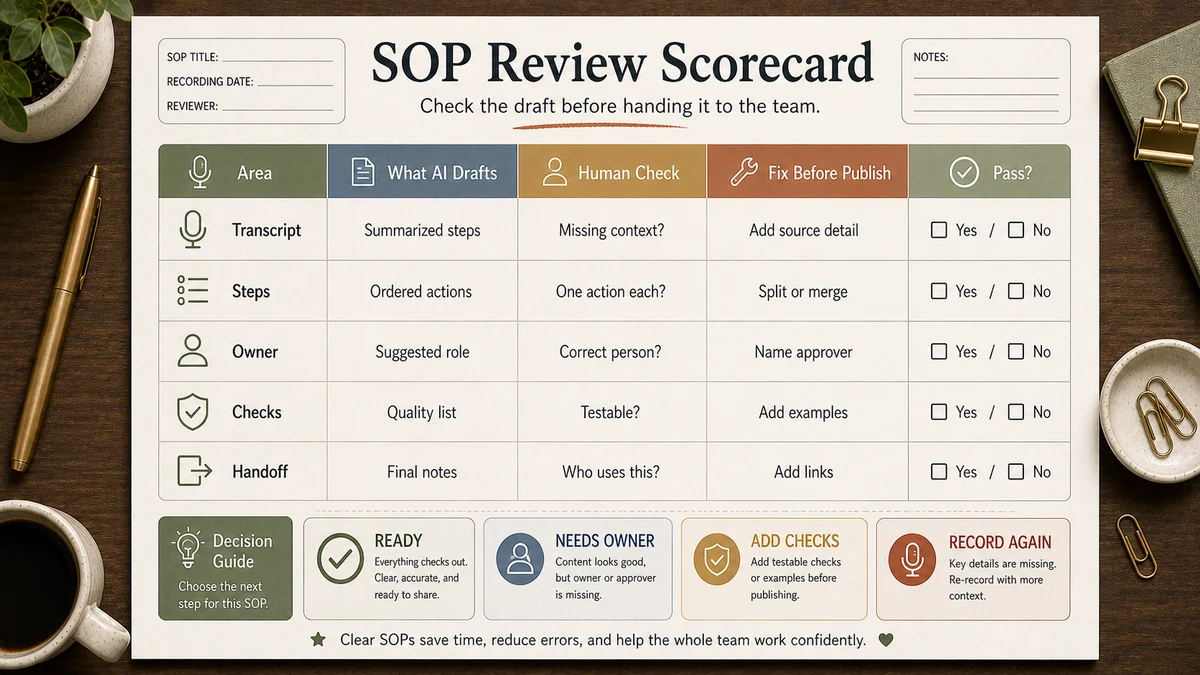
Workflow Artifact: SOP Review Scorecard
| Review check | Pass condition | What to do if it fails |
|---|---|---|
| Step accuracy | Every action appears in the recording or notes | Delete invented steps or re-record the missing part |
| Tool specificity | Tool names, links, and access levels are current | Add a human-review tag until verified |
| Failure coverage | Known mistakes are listed with prevention steps | Add the last two real errors before publishing |
| Cold-test clarity | A new runner can complete the task without side chat | Rewrite the stuck step and test again |
FAQ
What's the fastest way to write an SOP with AI?
Record yourself doing the task once, paste the transcript into the prompt above, and edit the output against the original recording. The speed gain comes from avoiding a blank page, not from skipping review.
How long should an SOP be?
Long enough to be unambiguous, short enough that someone will actually read it. Most useful SOPs land between 300–800 words. If yours is over 1,500 words, the underlying process is probably more than one SOP and should be split.
Should I use ChatGPT or Claude for SOP drafting?
Either can work if the prompt is strict and the reviewer checks the draft against source material. In our editorial testing, the bigger variable is not the model name; it is whether you provide real raw material and reject invented steps. See our ChatGPT vs Claude vs Gemini comparison for model-fit trade-offs.
How often should I update SOPs?
Whenever the underlying process changes, plus a quarterly audit. AI helps with both: re-record the changed step, regenerate the affected SOP section, then have a teammate spot-check.
Can AI write SOPs for tasks I've never done?
No — not usefully. AI can produce a generic-sounding SOP from a topic name, but those documents are almost always wrong in the specifics that matter. The whole point of an SOP is the specifics. Always start from raw material from someone who has actually done the task.
Final Recommendation
If you take only one thing from this guide: record yourself doing the task once, then let AI structure the recording into the SOP ? do not ask AI to write the SOP from a topic name. The recording is the evidence; the prompt is only the formatter. Everything else is review.
Pick one process this week that does not have an SOP. Record yourself doing it, run the prompt, and mark each generated step as keep, edit, or reject before anyone else uses the document.