Lingye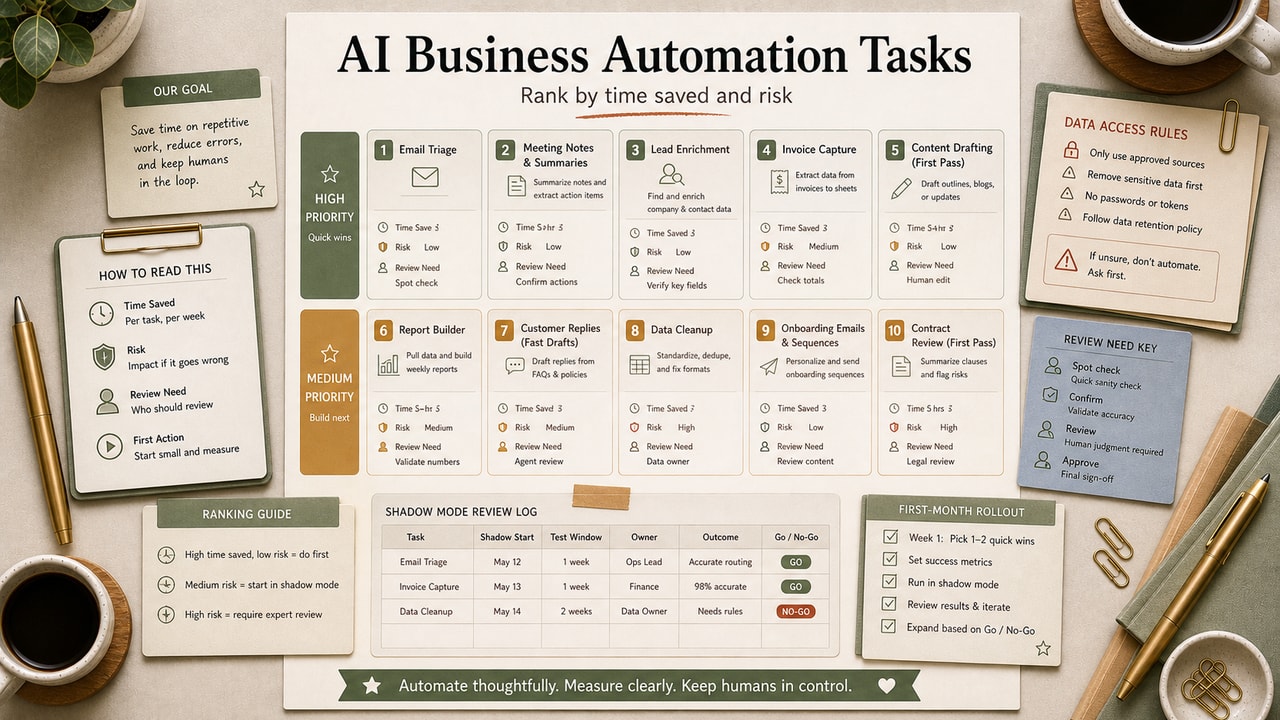
Most "AI for business" lists are 50 ideas long and hard to act on Monday morning. The problem is not a lack of ideas; it is that the ideas are not ranked by risk. The 10 tasks below are ordered as an editorial rollout path for small-business operators: internal, reviewable, low-risk work first; customer-facing work only after the review log looks clean. Read top to bottom and start with #1, not whichever sounds most impressive.
Quick Answer
The first business tasks to automate with AI should be low-risk, repeatable, and easy to review: meeting summaries, weekly reports, expense tagging, image alt text, SOP drafts, lead scoring, inbox labels, support reply drafts, blog repurposing, and feedback synthesis. Start with internal tasks before customer-facing work. Use shadow mode, log every output, and decide whether each task should stay manual, run as an AI draft, or move to partial automation based on your own review history. Before paying for more automation, define the source, reviewer, failure mode, fallback, and owner. If those five pieces are unclear, keep the workflow manual. A useful automation should make review calmer, not hide risk behind more connected apps, surprise routing, or customer-facing guesses. safely.
What This Workflow Is
This is a ranked starter list, not a comprehensive catalog. Each task is included because the input is repeatable, the output can be reviewed, and the failure mode can be logged before it reaches a customer.
Definition you can quote: AI business automation is the practice of delegating repeatable knowledge-work tasks (writing, classifying, summarizing, drafting) to AI tools while keeping human review for edge cases.
Who This Workflow Is For
- Best for: Solo operators and small teams with repeatable admin, reporting, content, or support tasks.
- Also useful for: Founders testing AI automation before buying more tools.
- Not ideal for: Regulated, high-risk, or emotionally sensitive workflows where a wrong answer creates legal, financial, or trust damage.
Workflow Summary: How We Ranked These 10
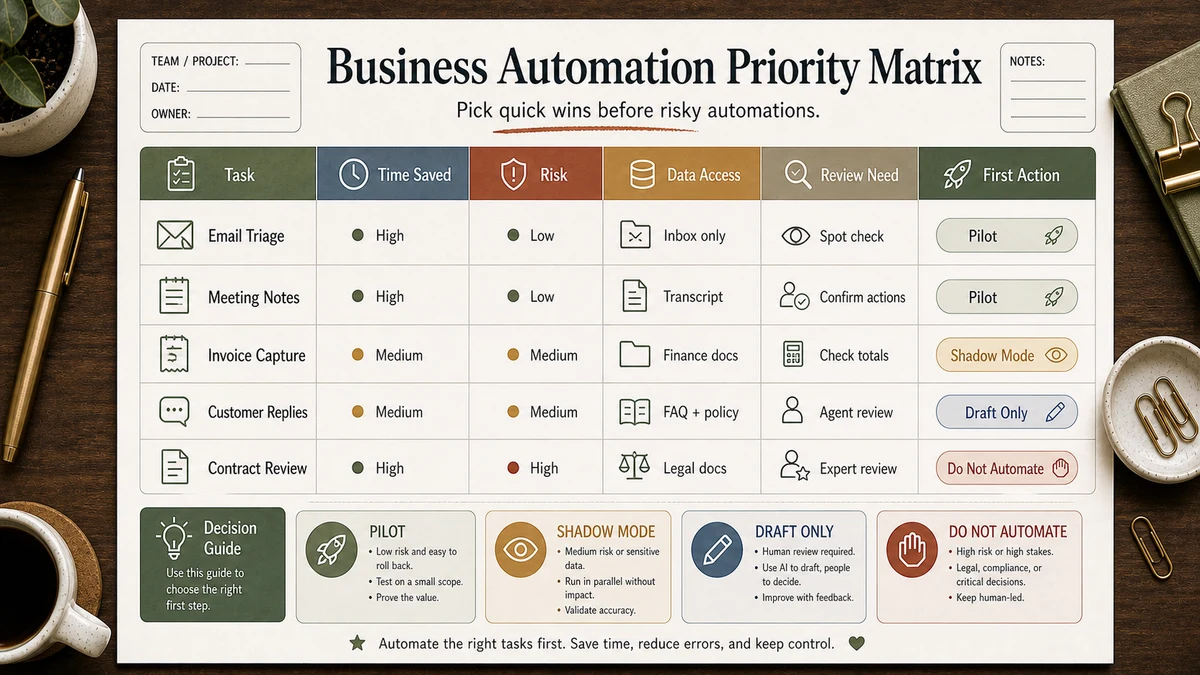
Two axes: time saved per week and risk if the AI is wrong. Internal tasks come first; customer-facing tasks need stricter rollout. The full tier-list framework lives in our AI Automation for Small Business guide.
Tools You Need
| Layer | Tool | Notes |
|---|---|---|
| AI brain | ChatGPT, Claude, or Gemini | Start with the tool you already use; check current plan limits before relying on long transcripts or bulk runs. |
| Automation | Zapier, Make, or n8n | Pick one workflow builder and keep the first month simple. |
| Logging | Google Sheets or Airtable | Always log prompts, outputs, confidence, and human decisions. |
Automation Decision Matrix
| Task type | AI role | Human gate | Rollout decision |
|---|---|---|---|
| Internal summary or report | Draft structured output | Spot-check for missing context | Good first automation candidate |
| Financial or operational labeling | Suggest category and confidence | Review anything ambiguous | Use only with a review queue |
| Customer-facing message | Draft reply only | Human approves before sending | Do not auto-send early |
| Strategic synthesis | Group themes with source IDs | Verify every theme against source notes | Useful for analysis, not final judgment |
Before You Automate: Risk Checklist
If you cannot answer these five questions, the task is not ready for automation yet.
- Source: What exact input should the AI read, and where does it come from?
- Review: Who checks the output, and how long should review take?
- Failure: What is the worst realistic mistake if the AI is wrong?
- Fallback: What should happen when the model is unsure?
- Owner: Who updates the prompt, source data, and escalation rule?
Step-by-Step Workflow: The 10 Tasks (in priority order)
1. Meeting transcript → summary + action items
Why first: high reviewability and low customer risk. Feed the transcript to Claude or ChatGPT with a structured output prompt: decisions, action items with owners, dates, and open questions. You can judge quality within a few meetings because the source transcript is right there.
2. Weekly report drafts
The shape of a weekly report rarely changes: progress, blockers, next week. Build a template, add raw notes, and let AI fill the structure. The useful win is consistency: the report is easier to review.
3. Expense category tagging
If your accounting tool exports transactions, AI can categorize them faster than you can. The fail-safe is asking AI to mark anything ambiguous as needs_human_review rather than guess.
4. Image alt-text generation
For blogs and product pages, AI generates accessible alt text faster than humans. Paste the image, ask for one sentence describing what's shown for a screen-reader user. Useful for both accessibility and SEO.
5. SOP first drafts
Document the process verbally, transcribe it, and hand it to AI with a "convert this into a numbered SOP" prompt. The output still needs an owner to verify edge cases, but it usually gives you a clean first structure instead of a blank page.
6. Lead qualification scoring
For inbound leads, AI can score against a defined ICP (ideal customer profile) faster and more consistently than spot-checking. Always run it in advisory mode first — score visible, route still manual — for at least 30 days before automating routing.
7. Inbox triage and labeling
Have AI read incoming emails and label them: "customer support," "sales," "vendor," "unsure." Don't auto-reply yet — just label so you can batch-respond.
8. Customer-support draft replies
Drafts only, never auto-send at the start. AI proposes a reply based on your support knowledge base; a human reviews and clicks send. The benefit is faster drafting, but the risk is stale policy language, missing customer context, or a confident answer to an ambiguous ticket.
9. Blog repurposing into social posts
One blog post → five social posts in different formats. Pull-quote, listicle, narrative, contrarian, summary. The trick is feeding voice samples; otherwise the social posts sound like generic LinkedIn content.
10. Customer feedback theme synthesis
Paste 50–200 pieces of feedback (NPS comments, support tickets, survey responses) into Claude. Ask for top 5 themes with source quote IDs. Demand source IDs for every theme, otherwise the AI may invent themes that don't exist in the data.
Example Input: Internal Task Brief
Start with one internal task and define the raw input, output shape, forbidden guesses, and review rule. Example: "Input is a meeting transcript. Output decisions, action items, owners, due dates, and open questions. If an owner or date is not stated, mark it as missing instead of guessing."
Copy-and-Paste Prompt (Universal Starter)
You are a back-office assistant for a small business.

Task: [pick one of the 10 above]
Input: [paste the raw material]

Output format:
[specify exactly what shape — e.g., JSON, table, labeled paragraph]

Rules:
- If the input is ambiguous, return {"status": "needs_human_review", "reason": "..."}
- Do not invent details (names, numbers, dates) that aren't in the input.
- Cite source IDs from the input where applicable.
- Stay under [N] words.

Return only the structured output.
Example Output: Reviewable Automation Result
{
  "status": "needs_human_review",
  "task": "meeting_summary",
  "reason": "Two action items have no named owner in the transcript.",
  "safe_to_auto_route": false
}
This output is useful because it refuses to guess. A good automation does not only produce answers; it also tells you when the input is too weak for automation.
Workflow Artifact: Sample Shadow-Mode Review Log
Use a short log before you let any automation change routing, customer messages, or financial records. The log makes the go/no-go decision visible instead of relying on a vague feeling that the AI is "good enough."
| Task | AI output | Human decision | Rule learned |
|---|---|---|---|
| Meeting summary | Missed one owner on an action item | Edit, keep in draft mode | Prompt must require owner names from the transcript. |
| Expense tagging | Marked an ambiguous transfer as software | Reject, add review label | Transfers need a separate category and human review. |
| Support reply draft | Used an old feature name | Reject, update knowledge base | Support drafts cannot outrun documentation quality. |
| Feedback synthesis | Grouped comments without source IDs | Reject, rerun with source IDs | No source IDs, no strategic decision. |
The point of shadow mode is not to prove AI is perfect. It is to discover the exact places where your prompt, documentation, or review queue needs a stronger rule.
Tested Workflow Notes
The practical test is not whether AI can produce one impressive answer. It is whether the same task produces reviewable outputs across several normal inputs, including messy ones. If the log shows repeated missing context, keep the task in draft mode or improve the source data before adding automation.
Pitfalls We've Actually Hit
- Auto-tagged expenses without confidence gate. AI tagged a category transfer as a refund. Took a week to catch in the books. Lesson: even "low-risk" tasks need a confidence gate the first month.
- Started with customer-facing replies (#8). The draft used a stale feature reference. Lesson: do tasks 1-5 first.
- Trusted feedback themes without source IDs. One theme was not in the source notes. Lesson: no source IDs, no strategic decision.
Common Mistakes
- Starting with task #8 because it sounds the most exciting. The tasks at the top are boring and high-ROI. Resist.
- Skipping the shadow-mode test. If you go live on day one, your first error happens on a real document.
- No
needs_human_reviewescape clause in the prompt. Without it, the AI guesses when uncertain. - Automating tasks you can't describe in 10 steps. If the manual process is fuzzy, the automation will be too.
- Letting prompts rot. Audit them quarterly — model behavior shifts after major releases.
Tool Alternatives
| If you can't use… | Try… | Trade-off |
|---|---|---|
| Zapier paid | Make.com or n8n | Steeper learning curve, lower cost at scale |
| ChatGPT API | Claude API or Gemini API | Different strengths; same prompts work |
| Google Sheets logs | Airtable or Notion | Same job; pick whichever you already use |
Sample First-Month Rollout Plan for Tasks 1-5
Instead of promising a universal number of hours saved, use the first month to measure your own baseline. The plan below is a sample rollout artifact you can copy into a tracker.
| Week | Task | Success signal | Stop signal |
|---|---|---|---|
| 1 | Meeting summaries | Action items match transcript with only small edits. | Owners, dates, or decisions are regularly missing. |
| 2 | Weekly report drafts | Report structure is reusable and review time drops. | The draft invents progress or hides blockers. |
| 3 | Expense tagging and alt text | Ambiguous items are sent to review instead of guessed. | The AI picks categories or descriptions without enough evidence. |
| 4 | SOP first drafts | The SOP captures the main sequence and exposes missing steps. | The process owner cannot verify the draft from source notes. |
At month end, keep only tasks that produce reviewable outputs and clear time savings. Everything else stays manual.
Go / No-Go Rule After the First Month
At month end, ask whether the automation produced boring, reviewable outputs. Keep it only if edits were small, uncertain cases routed to review, and the owner can explain the failure rule.
| Review log pattern | Decision |
|---|---|
| Small edits, no repeated failure, clear fallback | Keep and consider expanding volume. |
| Useful drafts but recurring missing context | Keep in draft mode and improve source data. |
| Confident wrong answers or customer-risk mistakes | Stop automation and redesign the task. |
FAQ
Which AI business task should I automate first?
Meeting transcript summaries (#1). The source material is complete, the output is easy to review, and mistakes usually stay internal. You can evaluate the workflow quickly because every action item should trace back to the transcript.
How much time can AI automation actually save a small business?
It depends on meeting volume, report cadence, support load, and how clean your source data is. The practical way to measure it is to record the manual baseline first, run one task in shadow mode, then keep the automation only if review time is meaningfully lower than manual time.
Is it safe to use AI for customer-support replies?
Only in drafts-only mode until you have enough reviewed examples to trust the knowledge base, prompt, and escalation rules. Keep a human approval step for anything ambiguous, policy-sensitive, emotional, or tied to billing.
Do I need to write code to automate these tasks?
No. Zapier, Make, and n8n let you connect AI APIs to spreadsheets, email, CRMs, and most SaaS tools without writing code. See our no-code AI tools decision tree for the right stack.
What's the minimum stack to start automating today?
An AI chat tool, one workflow builder, and a logging sheet are enough for a controlled test. Check current plan limits before you rely on bulk runs, long transcripts, or API-based workflows, then pay only when the review log proves the task is worth scaling.
Final Recommendation
If you take only one thing from this list: do tasks 1–5 for one full month before you touch anything below #6. The temptation is to jump to customer-facing automation because the savings look bigger; the actual ROI — and your customer trust — depends on you having proven the system internally first.
Pick task #1 this week. Run it in shadow mode, log every output, and only move to #2 when the review notes are boring. By the end of the month, you should know which tasks deserve automation and which ones still need better source data.