Lingye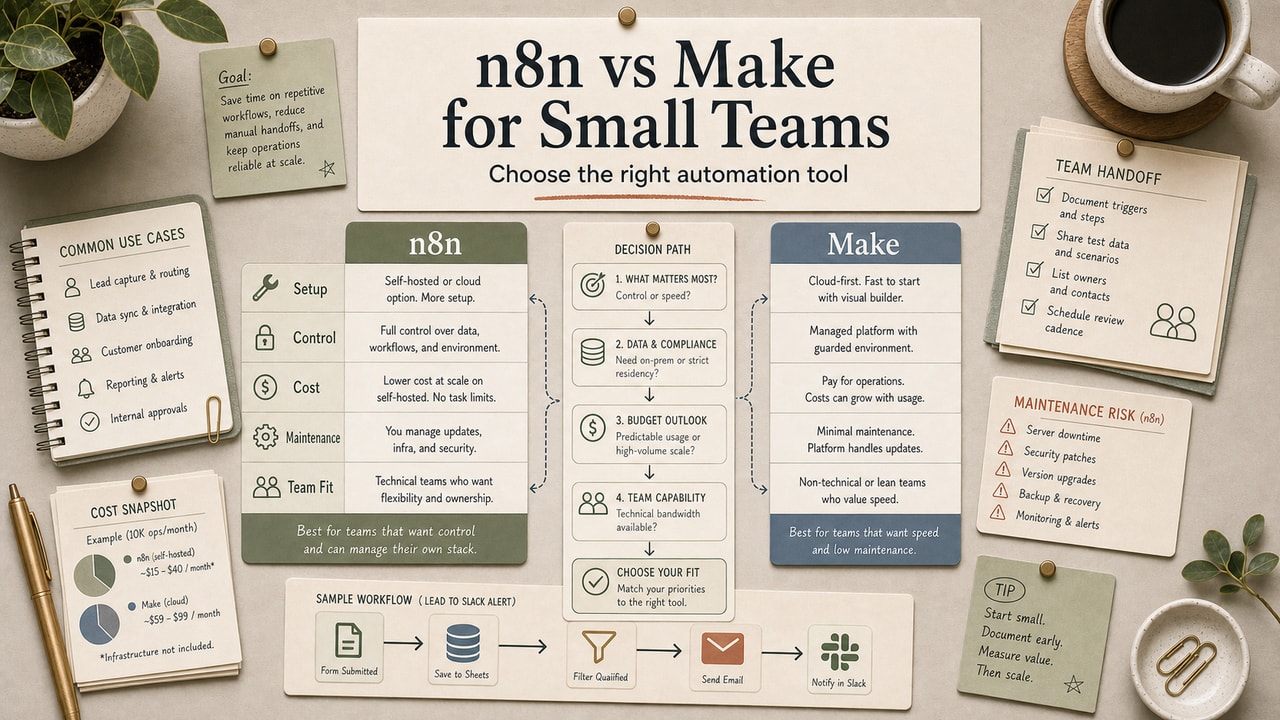
You probably know one team that swore by Make for two years and then moved to n8n, and another team that did the exact opposite. We have watched both happen, and neither team was automatically wrong. The truth is that n8n vs Make is not really a "which is better" question. It is a "which fits the way our team actually works" question, and most teams answer it from marketing copy instead of workflow evidence.
Quick Answer
Choose Make when a non-technical owner needs to launch quickly, the workflow is mostly SaaS-to-SaaS, and you do not want to think about hosting. Choose n8n when someone on the team can own setup and maintenance, you expect heavier branching or custom logic, or you want pricing based on full workflow executions instead of per-step credits. The wrong way to decide is to compare brand reputation or one headline plan price. The right way is to map your first few real workflows, check the current official pricing and licensing pages, and decide who will debug failures when the workflow breaks. That shifts the decision from tool fandom to operational fit and gives the team a shared review trigger before cost drift turns into a political argument.
What This n8n vs Make Comparison Covers
We'll compare n8n and Make on the six things small teams actually decide on: pricing, integrations, learning curve, AI features, error handling, and what tends to break at scale. We've used both in our own editorial pipeline, not for client demos but for the boring daily work, and we'll be honest about where each one bit us.
Who This Is For
Best for: small teams of a few people evaluating their first or second automation tool, solopreneurs running a modest set of recurring automations, and bloggers or creators automating content operations.
Also useful for: teams thinking about leaving Zapier because the bill got painful, or developers tired of stitching together cron jobs and scripts for routine tasks.
Not ideal for: enterprises with heavy compliance requirements from day one. That usually pushes you into enterprise contracts rather than a self-serve trial.
Tools You Need to Compare
| Tool | What it is | Current pricing signal | Best fit |
|---|---|---|---|
| n8n | Workflow automation with cloud and self-hosted options | Cloud pricing is execution-based, and self-hosted community plus paid self-hosted tiers are both available; verify the current plan page before you budget | Developer-leaning teams |
| Make | Cloud-first visual scenario automation | Pricing is credit-based, with a free tier and paid bundles that scale with scenario usage; verify the current plan page before you commit | Marketing-leaning teams |
Both tools cover common SaaS integrations and AI use cases. The real differences show up in pricing model, hosting, and debugging ownership.
The Quick Verdict - Which One Wins What
This is not a single-winner comparison. Each tool wins specific scenarios:
| If you... | Pick |
|---|---|
| Have a developer and want full control | n8n |
| Want to avoid hosting, updates, and backups | Make |
| Run branch-heavy AI workflows | n8n |
| Need a non-technical teammate to ship quickly | Make |
| Care about full-workflow execution pricing | n8n |
| Prefer pure clicks and minimal code | Make |
If you genuinely can't decide, start with the tool your team can debug this month. For teams with a real technical owner, n8n can be the cleaner long-term home earlier than expected.
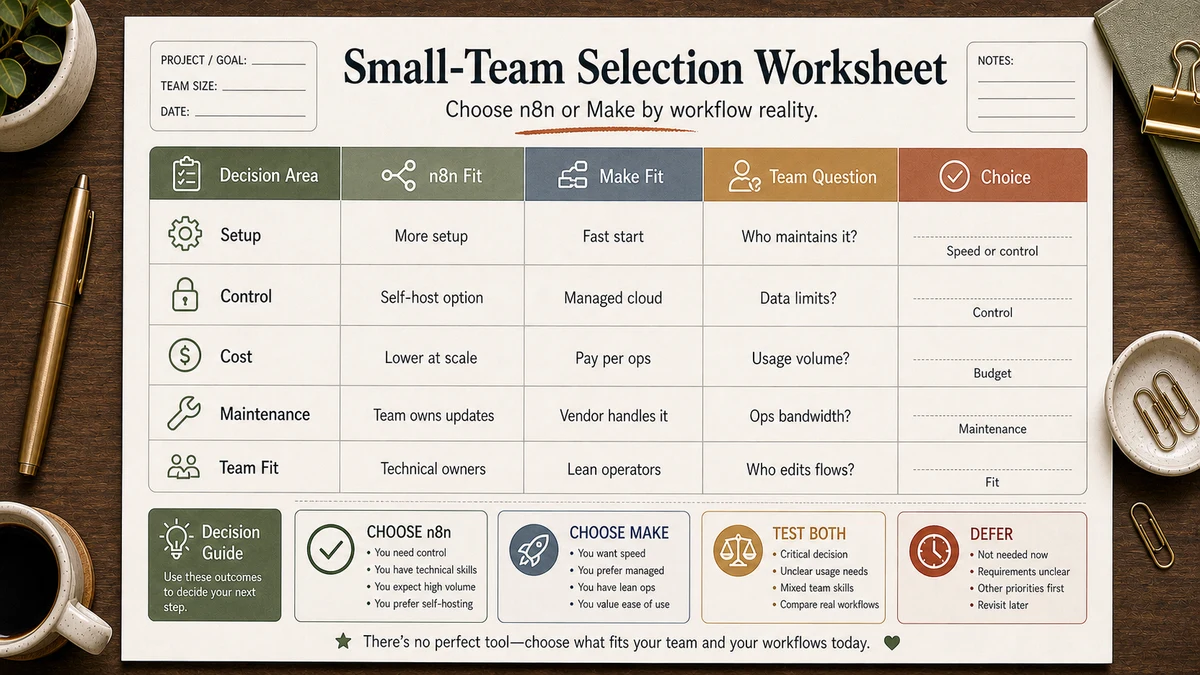
Workflow Artifact: Small-Team Selection Worksheet
| Question | If the answer is mostly yes | Bias the choice toward | Why it matters |
|---|---|---|---|
| Do we have a named person who will own hosting, updates, secrets, and failure recovery? | Yes | n8n | Without real ownership, self-hosting savings often turn into invisible maintenance debt. |
| Are our first workflows mostly SaaS-to-SaaS with light branching? | Yes | Make | Teams usually get to a working scenario faster when the workflow is simple and visual. |
| Will AI outputs decide retries, review queues, or conditional paths? | Yes | n8n | Branch-heavy logic gets harder to reason about when the tool is chosen only for setup speed. |
| Do non-technical teammates need to read and adjust the workflow every week? | Yes | Make | The easier the maintenance handoff, the lower the chance the workflow becomes one person's black box. |
| Do we expect a few high-volume workflows to dominate the monthly bill? | Yes | n8n | Execution-based pricing can become easier to predict once workload complexity grows. |
| Do we still feel unsure after this table? | Yes | Make first, then review | Start where the team can learn fastest, then revisit with real usage data instead of debate. |
This worksheet gives the team a shared language for the decision: owner, workflow shape, billing pressure, and maintenance reality. If you cannot answer the first row clearly, the technical upside of n8n usually arrives too early for the team you have today.
Step-by-Step: How to Decide Between n8n and Make
- List your top 5 automations - the ones you'd build first. Be specific about triggers, actions, review steps, and AI calls.
- Check integration coverage - open n8n's integrations page and Make's apps directory. Search each tool you need.
- Estimate monthly workload - count likely webhook fires, workflow executions, and AI calls. Most teams underestimate this at first.
- Check pricing at that volume - the headline plan price means very little until you compare it to your actual workload shape.
- Build one workflow on each free or trial tier - pick the same workflow and build it end-to-end on both. The "feel" matters more than the spec sheet.
- Commit to one for 90 days - switching mid-build is expensive even when the tool itself is cheap.
Copy-and-Paste Prompt: AI Decision Helper
You are an automation strategist. I'll describe a small team's situation, and you'll recommend either n8n or Make and explain why.

Team profile:
- Team size: [number]
- Technical comfort: [1-5, where 5 = comfortable reading and writing code]
- Top 5 automations we'd build: [list]
- Estimated monthly workload: [runs, executions, or credits]
- Most-used SaaS tools: [list]
- Budget tolerance for automation tooling: [USD/month]
- Self-hosting comfort: [yes / no / maybe with help]

Give me:
1. Your pick (n8n or Make) - be decisive
2. Three concrete reasons why
3. The top concern with your pick that I should plan for
4. A migration path if my situation changes in 12 months
Example Input
- Team size: 4
- Technical comfort: 3 (one of us writes basic Python)
- Top 5 automations:
  1. Auto-summarize Zoom transcripts into Notion
  2. Draft AI replies for inbound support tickets
  3. Weekly KPI report from Stripe + Google Analytics to Slack
  4. Repurpose blog posts into LinkedIn drafts
  5. Backup Notion databases to Google Drive nightly
- Estimated monthly workload: about 6,000 credits or equivalent runs
- Most-used SaaS: Notion, Slack, Stripe, Google Workspace, OpenAI, Zoom
- Budget: $50/month max
- Self-hosting comfort: maybe with help
Example Output
Pick: Make

Three reasons why:
1. Your top 5 automations are mostly SaaS-to-SaaS plumbing, and Make's app
   catalog reduces setup friction for non-developers.
2. Your current workload still fits the range where Make's lower paid tiers
   are plausible for a $50 budget, assuming branching stays moderate.
3. Your team's technical comfort is mid-level, so a visual scenario flow is
   easier for the non-coder teammates to read and maintain.

Top concern: AI call volume. Each workflow step and each model call affects
the bill, so one branch-heavy scenario can become expensive faster than the
headline plan price suggests.

12-month migration path: if a few workflows start dominating your monthly
bill or need heavier branching, move those specific workflows to n8n first
instead of rebuilding everything at once.
Tested Workflow Notes
We ran this decision workflow ourselves before publishing. Here's what we found:
- Input type: a short team profile covering size, technical comfort, workload shape, SaaS stack, budget, and self-hosting comfort
- Tool used: a current Claude model, with spot checks in Gemini and ChatGPT-class tools
- Best result: Claude gave the sharpest verdict with the clearest "top concern" line, which is the part most teams skip and regret later
- What failed: some model outputs kept hedging with "it depends" instead of making a choice, which is not helpful when a small team actually has to commit
- Manual edits still needed: the migration path line is often too generic, so we rewrite it around our own review triggers
What Would Make Us Reverse the Decision
If we start on Make, we revisit when one or two workflows dominate the monthly bill, when AI branches become harder to debug, or when a teammate starts asking for more code-level control. If we start on n8n, we revisit when the technical owner disappears, maintenance keeps slipping, or the team stops touching the workflows because they feel too fragile to edit.
Pitfalls We've Actually Hit
The "ops budget" miscount. A workflow that fetches 50 rows, processes each, and writes back can consume far more usage than the owner expects. Always run one real workflow and inspect the usage before you schedule it daily.
The "self-hosted is free" trap. n8n self-hosted may remove software fees, but it still costs setup time, updates, backups, credentials work, and the occasional late-night failure investigation. That trade-off is reasonable only when someone truly owns the stack.
The "we'll just migrate later" assumption. Migrating between n8n and Make is not a one-click export. Important workflows usually need a manual rebuild and retest. This is why "pick and commit for 90 days" matters more than picking perfectly.
Common Mistakes
- Picking based on integration count alone. Compare the tools you actually use, not the biggest marketing number.
- Underestimating AI call costs. Both tools charge for workflow usage, and you also pay the model provider separately. Budget for both. See OpenAI's API pricing and Anthropic's pricing for current rates.
- Skipping error handling. A workflow without a failure path will usually break at the worst possible time.
- Building one giant workflow. Smaller, modular workflows are easier to debug, version, and migrate.
- Not exporting workflow definitions. Keep your workflow logic somewhere outside the vendor UI, no matter which tool you pick.
Tool Alternatives
| Tool | When to consider | Notes |
|---|---|---|
| Zapier | Need the fastest setup and can tolerate a premium | Broad app coverage, but not our first choice for branch-heavy logic |
| Pipedream | You're a developer who prefers code-first automation | Good fit when visual builders start feeling restrictive |
| Workato | Enterprise team with budget and IT review | Usually overkill for most small teams |
| Huginn | Open-source purist wanting full control | Steeper learning curve than n8n |
We've covered the closest sibling comparison in Zapier vs Make for AI Automation, which is the other piece most small teams should read alongside this one.
FAQ
Is n8n really free?
n8n's self-hosted community edition is free to run, and n8n documents its licensing under the Sustainable Use License, a fair-code model. You still pay for hosting and maintenance time. If you do not want to manage that yourself, n8n Cloud is the simpler route; check official pricing for the current plans.
Which is easier for non-developers, n8n or Make?
Make is easier for non-developers. Its visual scenario builder is more forgiving because you drag, drop, configure, and run. n8n's interface is also visual, but the docs and community examples lean more technical, and advanced workflows often assume comfort with code or debugging logs. If your team has zero developers, Make is usually the safer first choice.
Can I use AI tools like ChatGPT or Claude in both?
Yes. Both n8n and Make support common AI-provider workflows. n8n also leans harder into code-friendly or agent-style patterns, while Make stays closer to a visual SaaS orchestration model. For simple "summarize this" or "draft a reply" use cases, either can work; the difference is usually ownership, branching, and billing shape.
What about switching from Zapier?
Make is the easier Zapier alternative because the mental model is similar: cloud-hosted, visual, and priced around workflow usage. n8n can be the cheaper long-term alternative, but only when the team can absorb the setup and maintenance work. Review the switch when Zapier costs feel persistent, not because one comparison chart promised an easy win.
How do small teams usually use n8n or Make for AI workflows?
The pattern we see most often is simple: trigger from a SaaS event, call an AI model to process or summarize, then write the result back to a SaaS tool or review queue. Common examples include meeting transcript summaries, first-pass support replies, and content repurposing flows. We cover the broader patterns in our small-business automation tier list and our list of business tasks worth automating first.
Final Recommendation
For most small teams, our recommendation is simple: start with Make if you want speed and minimal infrastructure thinking, and start with n8n if you already have a technical owner who will maintain the workflows after launch. The decision gets easier once you assign real ownership instead of debating abstract features.
The mistake we keep watching small teams make is deferring the decision by splitting their automations across too many trial tools. Pick one, commit for 90 days, and revisit only after you have real execution logs, real failure patterns, and a clearer picture of who maintains the stack.