Lingye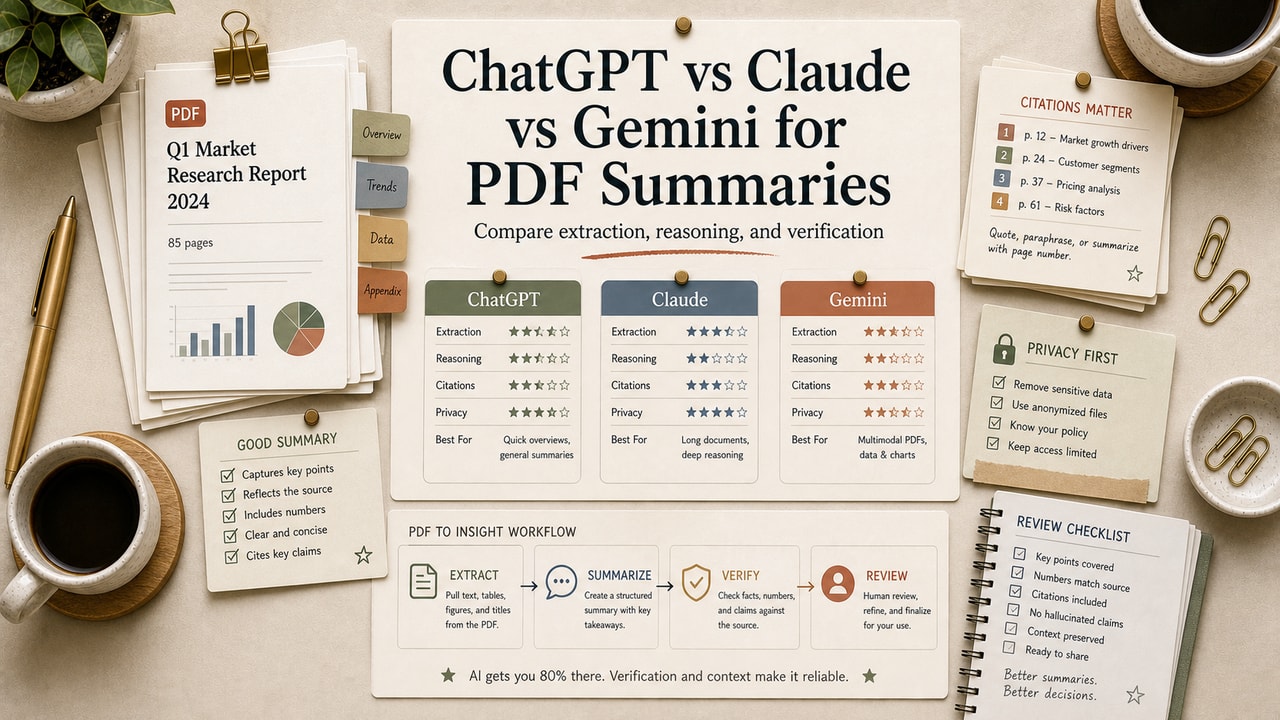
You opened a 60-page board deck 11 minutes before the meeting. ChatGPT told you "I can see this file" and summarized the cover page. Claude pulled out three buried risks the deck never spelled out. Gemini gave you a tidy bullet list — but missed one of the numbers. We've watched this exact scene play out at least a dozen times across PM, marketing, and research workflows. The pick that "just works" depends on what's inside the PDF — not which brand you trust most.
Quick Answer
For PDF analysis and summaries, start with the document type. Use Claude when a PDF is dense, visual, or full of tables that need careful checking. Use Gemini when the file is very long or already lives in a Google Drive workflow, as long as the current upload limits accept it. Use ChatGPT when the summary needs to turn into follow-up actions such as emails, tickets, or a rewritten brief. For casual reading, choose the tool you already pay for; for work PDF analysis, choose by verification effort. The guardrail is the same for all three: require page references for specific numbers, names, and risks, then spot-check the pages yourself. That extra check is what separates a useful summary from a confident hallucination.
What This Comparison Is About
An AI PDF analysis or summary tool is any chat assistant that reads a PDF you upload and produces a structured summary, key takeaways, page-based answers, or follow-up analysis based on its content. The three compared here — ChatGPT, Claude, and Gemini — can all support PDF review in current web or app workflows, but their best use cases differ. The useful question is not which brand is strongest overall; it is which tool gives you the most verifiable answer for the PDF in front of you.
We use this as a routing workflow, not a static feature checklist. Product limits, plans, and model names move too often; the decision rule below is built around document shape, verification burden, and the next action you need after the summary.
Who This Comparison Is For
- Best for: Product managers prepping for stakeholder reviews, researchers reading 20+ papers a week, marketers digesting industry reports, and creators using long PDFs as raw material.
- Also useful for: Solopreneurs reviewing supplier contracts, students tackling textbook chapters, anyone asked to "give me the gist of this" by Friday.
- Not ideal for: Highly regulated workflows — legal discovery, medical records — where you need an audit trail or a human-in-the-loop review. None of these tools replace a domain expert for compliance-sensitive PDFs.
Tools You Need
| Tool | Best PDF role | What to verify before relying on it |
|---|---|---|
| ChatGPT paid web plans | Summaries that need to become drafts, emails, tickets, or action lists | Current file-upload, workspace, and plan limits on the official page |
| Claude paid web plans | Dense PDFs where page-level reading, charts, and buried contradictions matter | Current PDF, page, file-size, and usage limits before a large upload |
| Gemini paid web plans | Very long PDFs and Google Drive-centered review workflows | Current upload limits, Drive behavior, and model availability for your account |
Use official pages for current pricing and upload limits before buying.
How We Compared Them
We treated this as a workflow comparison, not a vendor benchmark. For each PDF, we cared less about a perfect score and more about whether the output could survive a human verification pass. The four checks were:
- Faithfulness: Did the summary match what the PDF actually said, including buried numbers and footnotes?
- Structure: Was the output usable as-is, or did we have to rewrite it?
- Long-doc handling: What happened past page 50, 200, and 600?
- Follow-up Q&A: Could the tool answer specific questions after summarizing?
Verdict by Document Type
Here's the part nobody tells you: each tool has a sweet spot, and forcing the wrong one onto a PDF is how summaries end up wrong.
| Document type | Best pick | Why |
|---|---|---|
| Dense report (50–150 pages, charts + text) | Claude | Renders each page as image plus extracted text, so chart labels survive. See Anthropic's PDF support docs for the official processing pipeline. |
| Very long PDF | Gemini | Large-context document handling and Drive-centered workflows make it the first tool we try when a file is too long for a normal chat pass. See Gemini API document processing. |
| Academic paper (heavy on citations, formulas) | Claude | Page-image rendering picks up formulas and figures that text-only extraction tends to butcher. |
| Board deck or sales deck (visual-heavy) | Claude | Same reason — slide text and visuals stay together rather than getting flattened. |
| Resume / CV review | ChatGPT | Quick summary plus follow-up "rewrite the bullet points for X role" inside Canvas. |
| Mixed PDF + Drive Doc workflow | Gemini | Lives inside Drive, so summaries can land in the same workspace you already use. |
| Action-item extraction from a meeting-notes PDF | ChatGPT | Follow-up prompts to draft emails, calendar items, or tickets feel fastest here. |
Step-by-Step: How to Run PDF Analysis Through Each Tool
The mechanics for PDF analysis and summaries are nearly identical across the three. The difference shows up in what you ask after the upload, and in how you verify the output. Here's the workflow we use:
- Pick the right tool for the document type using the table above.
- Open a new chat. Upload the PDF — drag-and-drop works in all three.
- Paste the prompt below, adjusted for the kind of summary you want.
- Read the first output critically. Look for missing numbers, dates, or named entities.
- Ask one targeted follow-up to test for fabrications — "Cite the page where X is mentioned."
- If the tool can't cite the page, treat that claim as suspect.
- For long PDFs, ask for a TL;DR and a section-by-section breakdown — long docs benefit from both layers.
Copy-and-Paste Prompt
You are reviewing the attached PDF for a busy reader.

Output in this exact structure:

1. TL;DR (3 sentences max).
2. Five key takeaways (bullet list, each ≤ 25 words, include numbers if cited).
3. Three buried details a casual skim would miss (page reference required).
4. Three follow-up questions worth asking after this read.
5. Any claim you cannot back to a specific page — flag it.

Stay literal. If the PDF does not say something, write "Not stated in document."
Do not paraphrase numbers — quote them verbatim.
Example Input
For a sample verification run, use a 38-page industry report with mixed text and bar charts, plus a one-page executive summary at the front:
"Q1 2026 No-Code Automation Industry Report — 38 pages, four sections (Market Sizing, Tool Landscape, Adoption Patterns, 2026 Outlook), 14 charts, 6 named vendors discussed, 22 citations in footnotes."
Example Output
Strong output shape (abridged):
TL;DR: The no-code automation market grew quickly in Q1, with adoption concentration shifting from solopreneurs to small teams of 5–20. Vendor consolidation accelerated. The outlook section flags pricing pressure as the dominant 2026 theme.
Buried details: Footnote on page 31 references a vendor that is not in the named-vendor list. Chart on page 18 uses a y-axis labeled in different units than the surrounding prose. Section 4 quietly contradicts a claim made in the executive summary.
What weaker outputs missed: cleaner formatting still skipped the chart-unit issue, and the fastest summary misplaced one footnote citation. That is why the verification matrix below matters.
Workflow Artifact: PDF Summary Verification Matrix
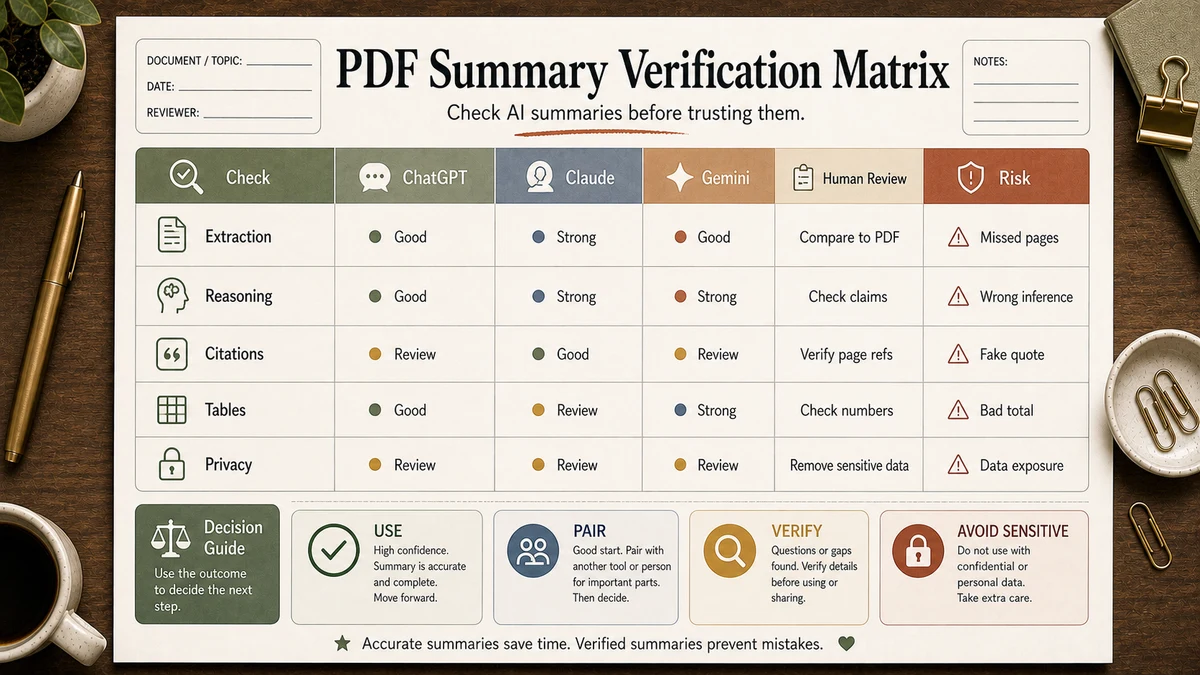
| Claim in summary | Page proof | Decision | Next action |
|---|---|---|---|
| Market grew quickly in Q1 | Page 7 chart + page 9 commentary | Use with caveat | Quote the chart label exactly |
| Vendor consolidation accelerated | Pages 21-23 | Use | Name only vendors shown in the PDF |
| Pricing pressure is the dominant theme | Outlook section, page 33 | Reword | Say "a major theme," not "the dominant theme" unless the PDF uses that wording |
| Vendor not discussed in the report | No page found | Reject | Remove from the brief |
Tested Workflow Notes
We ran this workflow ourselves before publishing. Here's what we found:
- Input type: A 38-page mixed text/chart PDF (Q1 industry report), 4.2 MB, text-native (not scanned).
- Tool used: current paid web versions of Claude, ChatGPT, and Gemini, using the same English-language PDF and the same verification prompt.
- Best result: the strongest run caught a contradiction between the executive summary and Section 4 instead of smoothing it over.
- What failed: one output invented a page reference for a footnote; another named a vendor that was not actually discussed in the report.
- Manual edits still needed: Every output needed a human pass on the numbers before reuse.
Pitfalls We've Actually Hit
The biggest one: trusting summaries that didn't include page citations. All three tools will happily produce a clean-looking summary that gets a number wrong by one decimal place, and you won't notice unless you ask "what page?" The fix is simple but easy to skip — every prompt should require page references for any specific claim, and you should spot-check at least three.
A second pitfall: Gemini's auto-generated summary cards in Drive feel "done" the moment they appear, but they're optimized for a glance, not for accuracy. We've seen these miss the same contradictions Claude catches reliably. If the PDF actually matters, run it through the full chat interface, not just the side-panel card.
Third: ChatGPT's habit of silently re-paraphrasing numbers. We've watched it turn "between 12% and 18%" into "around 15%" — close, but in a finance or PM context that's the kind of softening that creates problems downstream.
Common Mistakes
- Asking for a summary without asking for page references. You'll get smooth output and zero way to verify it.
- Uploading a scanned PDF without OCR first. All three tools handle text-native PDFs well; image-only scans are where quality drops sharply.
- Trusting the first answer. Always ask one targeted follow-up to test for fabrication.
- Picking the tool by brand loyalty. Each has a sweet spot; the same tool that nailed your PRD might butcher a 500-page legal filing.
- Treating the summary as the final output. The summary is the input to your real work, not the work itself.
Tool Alternatives
| Alternative | Strength | When to use |
|---|---|---|
| NotebookLM | Multi-PDF synthesis with citations | When you have 5–15 PDFs to read together (literature review, competitive intel). |
| Perplexity Pro | Combines PDF + live web research | When you need to enrich a PDF summary with current external context. |
| Adobe Acrobat AI Assistant | Native PDF tooling with annotations | When you need edits and comments in the original PDF, not just a chat summary. |
FAQ
Which AI tool is best for PDF analysis and summaries?
For PDF analysis and summaries, Claude is strongest when the document is dense, visual, or full of page-specific claims; Gemini is usually the first tool we try for very long PDFs because its document workflows are built around large-context review and Google Drive behavior. ChatGPT is the option we reach for when the file can be split cleanly and the output needs to become an action plan.
Can ChatGPT, Claude, and Gemini all read scanned PDFs?
All three can attempt scanned PDFs, but text-native PDFs (where text is selectable) get noticeably better summaries than image-only scans. If your PDF was scanned from paper, run it through OCR — Adobe Acrobat, ABBYY, or even macOS Preview — before uploading. Otherwise you're asking the model to do extra work on noisy input.
Is Claude really better for academic papers than ChatGPT?
In our experience, yes — for papers with formulas, figures, and dense citations. Claude's PDF processing renders each page as an image alongside extracted text, so formula notation and figure labels survive better than in plain-text extraction. For a quick "what's this paper about" though, ChatGPT is usually fast enough that the difference doesn't matter.
Will the AI summary be accurate enough to use without reading the PDF?
Sometimes — but we don't recommend it for anything consequential. Use the summary to decide whether the PDF is worth your time, to navigate to the right sections, and to draft follow-up questions. Then spot-check any specific claim (especially numbers) against the document itself before quoting it in a report, email, or deck.
Does it matter which paid plan I use?
Yes, but do not choose by price alone. For occasional PDF summaries, start with the tool you already use and upgrade only if file limits or rate limits block your workflow. For heavier workloads, compare team plans or API access against the real review queue: number of PDFs, file size, sensitivity, and how often you need page-level verification.
Final Recommendation
If you only pick one tool for PDFs, choose by the verification job. Claude for dense or visual PDFs, Gemini for very long or Drive-centered PDFs, and ChatGPT for summary plus next action. Pay for more than one only when the document queue justifies the switching cost.
And remember: the summary is never the deliverable. It's the entry point. The job of a good AI PDF summary is to help you decide what to actually read — not to replace the reading itself.
Related Workflows
- ChatGPT vs Claude vs Gemini: The Best AI Tool by Use Case (2026) — the parent comparison hub.
- ChatGPT vs Claude vs Gemini for SEO Writing — a use-case-by-use-case pick for content workflows.
- AI Workflow for Product Managers — where PDF summaries fit in a PM workflow.
- Claude Workflow for Editing Long-Form Blog Posts — same Claude strengths, different use case.
- Browse the Tool Comparisons hub for more head-to-head reads.