Lingye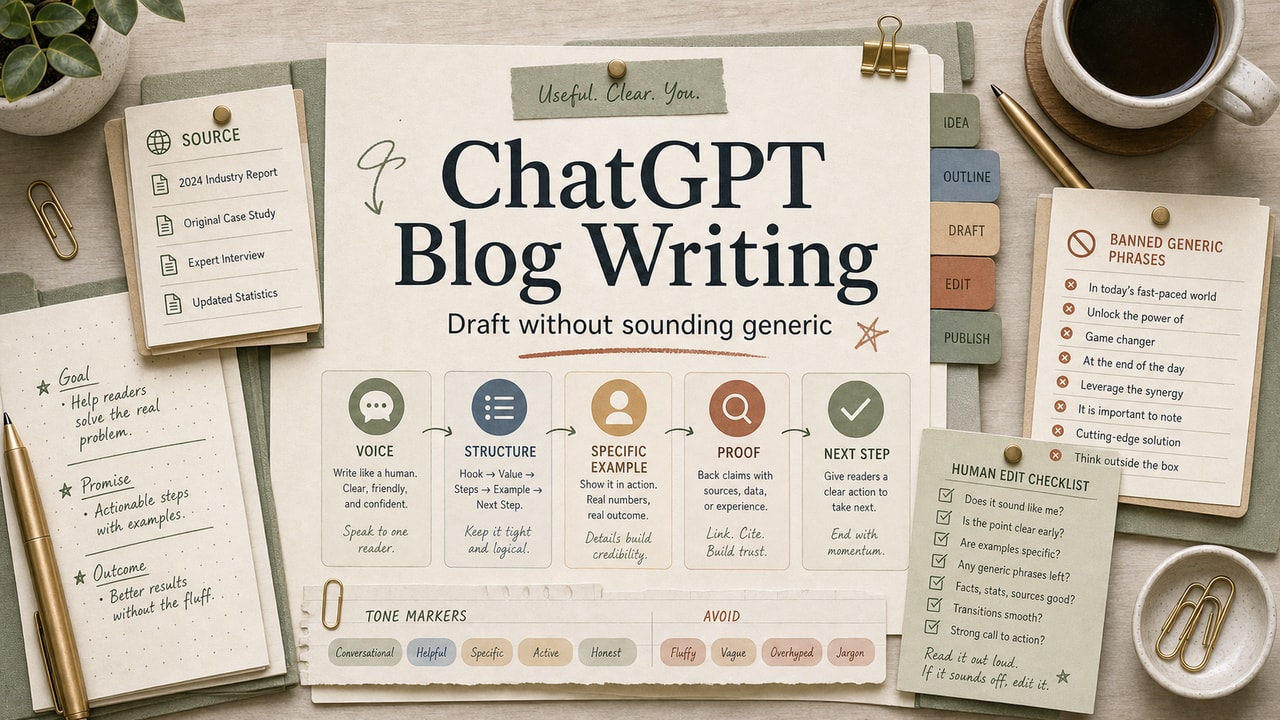
Generic ChatGPT blog drafts usually fail before the model writes a sentence: the input package is too thin. If the prompt only gives a topic, ChatGPT falls back to average marketing-blog English. The fix is not a cleverer one-line prompt; it is a repeatable input package plus a human voice review. Below is the four-input pattern we use as an editorial workflow: context, voice samples, outline, banned words, then a section-by-section review before publishing.
Quick Answer
To use ChatGPT for blog drafts without sounding generic, give it four inputs before it writes: a short product or topic context, three paragraphs of your own writing as voice samples, the H2 outline you chose, and a banned-word list for phrases you never want in the draft. Ask for one section at a time, then review each section against a voice scorecard before publishing. This works best when you already have an angle, examples, and a reader decision in mind. Do not use it to invent firsthand experience, current tool facts, or an opinion you have not formed yet; gather that evidence first, then let AI organize the draft. If the first section still feels anonymous, stop and fix the inputs instead of generating the full article.
What This Workflow Is: Fix the Input Before the Draft
ChatGPT doesn't have a default "voice." It has the average voice of everything it has read. When your prompt doesn't specify what makes your writing different, the model defaults to the median — which happens to be marketing-blog English. The fix isn't a fancier prompt; it's feeding ChatGPT enough of your material that the average shifts toward you.
Who This Workflow Is For
- Best for: Bloggers, creators, and content marketers who already have 5+ published posts in their own voice.
- Also useful for: Newsletter writers and freelance writers ghostwriting in a client voice.
- Not ideal for: First-time writers (you don't have voice samples yet) or technical reference content where the goal is information density, not voice.
Workflow Boundary: When Not to Use This Pattern
This workflow is for drafting in a voice you already understand. It is not a substitute for reporting, tool testing, customer research, or fact-checking. If the section needs current product details, pricing, policy language, or firsthand proof, collect that evidence first.
| Situation | Best move | Why |
|---|---|---|
| You have your own angle and examples | Use the 4-input draft pattern | The model can shape your raw material without inventing the point of view. |
| You have only a keyword and no opinion | Write the angle manually first | AI will fill the gap with average advice. |
| The section depends on current tool facts | Verify official sources before drafting | Voice polish does not fix a wrong or outdated claim. |
| The intro or conclusion feels important | Draft manually, then use AI for variants | Those sections carry trust, positioning, and reader motivation. |
Tools You Need
| Layer | Tool | Use it for |
|---|---|---|
| Drafting model | ChatGPT, Claude, or Gemini | Section-by-section drafting after the input package is ready. |
| Voice library | Notion, Google Docs, or a saved text file | Store the reusable context block and three voice samples. |
| Review tracker | Google Sheet or checklist | Score each section before it moves into the article draft. |
Workflow Summary: The 4 Inputs That Kill Generic ChatGPT Output
| Input | Why it matters | Time to prepare |
|---|---|---|
| Product/topic context (200 words) | Stops generic SaaS-isms; grounds output in your actual situation | One-time: 15 minutes; reuse forever |
| 3 voice samples (your own paragraphs) | Shifts the model's average toward your phrasing | One-time: 5 minutes; pick from existing posts |
| Your H2 outline | Forces structural specificity; prevents drift | 20 minutes per post |
| Banned-word list | Removes the AI fingerprint at draft time, not edit time | One-time: copy ours below |
After the one-time setup, the recurring work is the outline and section review. Treat the prep as editorial control, not overhead: it is what keeps the model from filling gaps with generic phrasing.
Step-by-Step Workflow: How to Run It
Step 1: Build your reusable context block
Write 200 words about your blog or product: who it's for, what kind of writing you publish, the tone you want, the words you avoid. Save it as a Notion snippet or text expander shortcut. This single block is the biggest lever in the whole workflow. Without it, every draft sounds like a generic SaaS blog.
Step 2: Pick 3 voice samples from your existing writing
Open three of your published posts. Copy one paragraph from each - ideally the kind of paragraph you are proud of, or the kind you reuse a lot. Save them. Three paragraphs are a practical starting point: enough repeated phrasing to show the model your rhythm without using the whole context window.
Step 3: Outline the article first (manually, not with AI)
Write the H1, target reader, and 6–8 H2 headings yourself. If you skip this step, you're asking ChatGPT to invent your structure — and structure is exactly where the generic voice creeps in. Our 5-stage AI writing workflow has the full outline pattern.
Step 4: Use the 4-input prompt
Paste all four inputs into ChatGPT (or Claude — the pattern works on both), then ask for one section at a time, not the whole article. Section-by-section drafts are the second-biggest lever after the context block.
Step 5: Always rewrite the intro and conclusion yourself
These are the two places ChatGPT's voice leaks through hardest. No prompt fixes them reliably. Five minutes of you rewriting them is worth more than thirty prompt iterations.
Example Input: Voice Context Block
A useful input package is specific but short. For example: "This blog writes practical AI workflow guides for solo operators and small teams. The voice is direct, skeptical of vague productivity claims, and focused on decisions the reader can make today." Add three paragraphs from your own work after that context.
Copy-and-Paste Prompt: The 4-Input Template
You are helping me draft one section of a blog post in my voice.

# Voice context
[paste your 200-word product/topic context]

# Voice samples (3 paragraphs from my published posts)
Sample 1: [paragraph]
Sample 2: [paragraph]
Sample 3: [paragraph]

# This article
H1: [your headline]
Target reader: [one-sentence description]

Full H2 outline:
[paste outline]

# Banned words and phrases (do not use)
- generic opening phrases about the modern world
- overdramatic verbs that promise transformation
- corporate filler nouns about efficiency
- vague adjectives that could describe any product
- summary phrases that announce the conclusion instead of concluding
- in conclusion / in summary

# Now write
Write ONLY the section titled: [exact H2]
Length: 250–350 words
Voice: match the samples above. Avoid the banned words.
End with one sentence that transitions to the next H2.
Output: just the prose, no preamble.
Example Output
Run the prompt with H2 "Why most ChatGPT drafts feel hollow." A clean output looks roughly like:
Most ChatGPT drafts feel hollow because the model is doing its job too well. Ask for "a blog post about productivity" and it gives you the average productivity post. The fix is not prettier wording; it is the specific angle, example, and tradeoff only your article would include.
Notice what is missing: no generic opening, no corporate filler, and no inflated promise. The transition sentence is concrete. That is what the 4-input pattern is designed to produce.
What the editor should still change: add one real example, remove unverifiable claims, and check that the transition fits the next H2. Natural-sounding prose still has to teach something.
Tested Workflow Notes
The most useful review moment is after the first section, not after the full article. If section one sounds generic, the problem is usually missing context, weak voice samples, or an outline that is too broad. Fix the input package before drafting the rest, because later sections tend to repeat the same flaw.
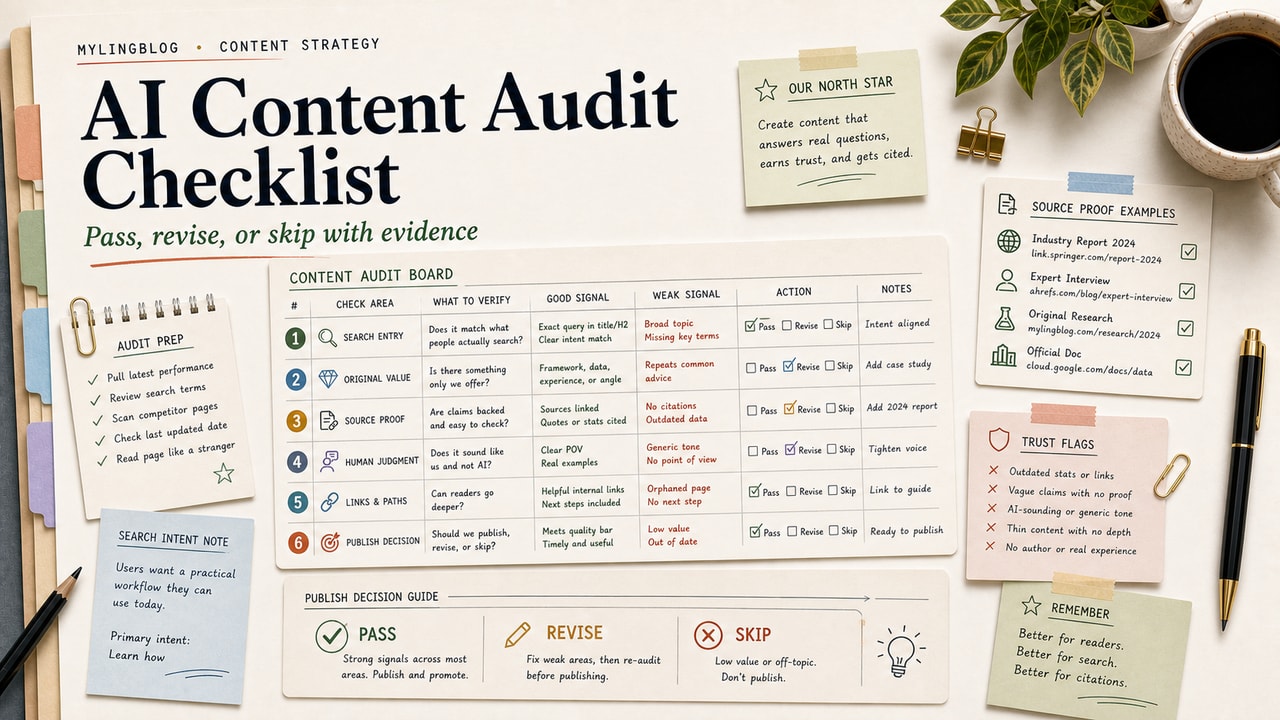
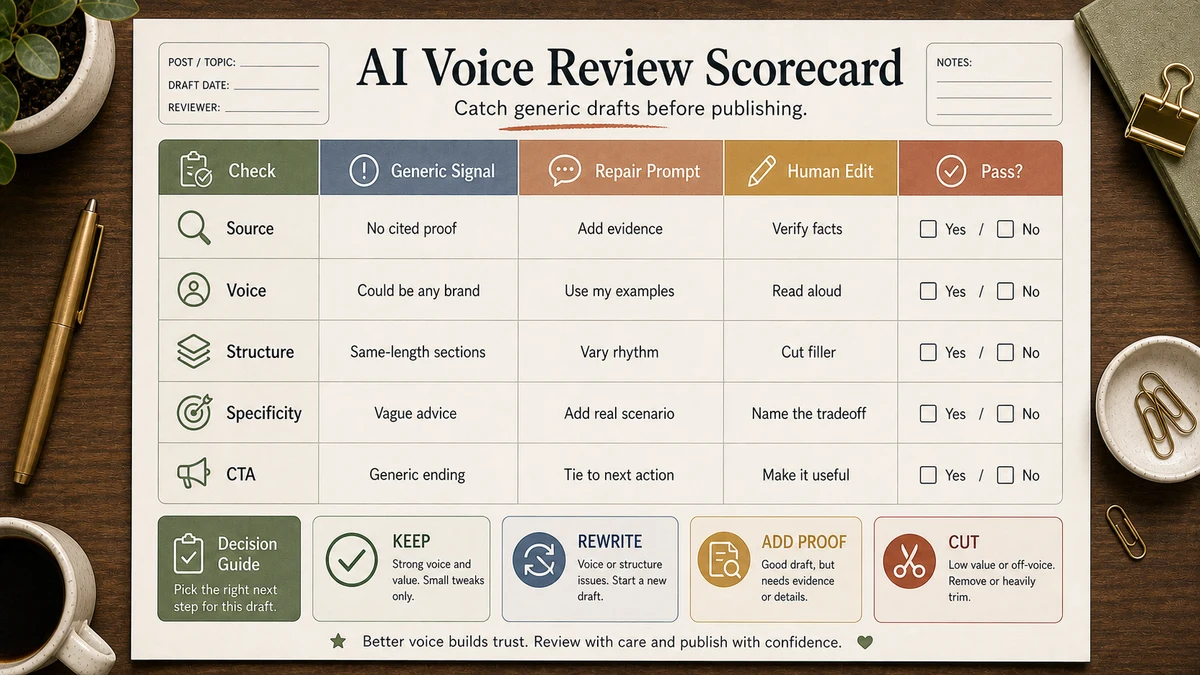
Workflow Artifact: AI Voice Review Scorecard
Before a section goes into the draft, score it against this small rubric. The goal is not to make the prose sound clever; it is to catch the generic failure modes while the section is still cheap to revise.
| Check | Pass signal | Reject signal |
|---|---|---|
| Specific angle | The section says something a generic listicle would not say. | It could fit any blog in the same niche. |
| Voice match | Sentence length, transitions, and examples resemble your samples. | It uses polished but anonymous marketing language. |
| Evidence boundary | Facts, product claims, and examples are either sourced or framed as examples. | It invents numbers, tests, or user behavior. |
| Reader decision | The reader knows what to do, skip, test, or rewrite next. | The section explains the topic but does not change a decision. |
If a section fails two rows, regenerate it with narrower instructions or rewrite it manually. Do not keep asking for a more "human" tone; tell the model exactly which row failed.
Pitfalls We've Actually Hit
- Left default Custom Instructions on. The draft drifted back to generic helpfulness. Lesson: check the model setup before blaming the prompt.
- Skipped voice samples on a deadline. The section was usable but boring. Lesson: samples are not optional.
- Forgot the banned-word list. Every section picked up inflated marketing verbs. Lesson: prevent cleanup at draft time.
Common Mistakes
- Asking for the whole article in one shot. Voice drifts after section 3 reliably.
- Skipping the voice samples. The single biggest reason drafts sound generic.
- Using a fresh ChatGPT chat per section. Costs context. Use one chat per article so the model keeps your voice context active.
- Trusting the introduction without rewriting. The intro is where AI voice leaks first.
- Editing during drafting. Slows you down and produces a worse result. Draft fully, edit once.
Tool Alternatives
| If you cannot use... | Try... | Trade-off |
|---|---|---|
| A paid ChatGPT plan | ChatGPT free tier, Claude, or Gemini | Check current message and context limits before using a long article workflow. |
| ChatGPT | Claude | Often needs less cleanup on long prose, but the same 4-input pattern still applies. |
| Manual voice samples | A reusable assistant or project with samples saved | Faster per session, but review the output so it does not drift into house-style boilerplate. |
| Ad-hoc context | Notion snippet, text expander, or saved prompt file | Saves typing the same context every time and makes the workflow easier to audit. |
Sample Side-by-Side Review: Same Outline, Better Inputs
Here is a realistic review artifact for the same H2, "What to look for in a CMS." It is a sample editorial comparison, not a benchmark or a guarantee that every model will behave the same way.
Weak brief: "Write a blog section about choosing a CMS." The likely draft opens with broad importance language, avoids naming tools, and gives advice such as "choose a user-friendly platform" without showing how the reader should decide.
4-input brief: Product context, three voice samples, the exact H2 outline, and the banned-word list. The useful draft should name specific options such as WordPress, Ghost, or Hashnode only when the article context supports them, then explain the trade-off the reader must actually make.
Editorial decision: Keep sentences that create a real choice, cut sentences that only sound polished, and verify any product or pricing claim before publishing. That is the difference between AI-assisted drafting and generic AI content.
FAQ
Why does ChatGPT sound so generic by default?
Because the model produces the average of everything it has read. Without specific context, voice samples, and structural constraints, the average is marketing-blog English. The fix is to give the model enough of your specific material that its output skews toward you instead of toward the average.
How many voice samples do I need to feed ChatGPT?
Three paragraphs is a practical starting point. Pick typical paragraphs, not your most polished lines, so the model learns your normal rhythm.
Should I use ChatGPT Custom Instructions for blog writing?
Carefully. The default Custom Instructions can push output toward generic helpfulness. Either disable them when drafting, or replace them with the 200-word context block from this article. Many writers we know turn Custom Instructions off entirely for creative work.
Can I use this pattern for other AI tools besides ChatGPT?
Yes. The 4-input pattern works on Claude and Gemini with the same effectiveness; only the phrasing of the prompt header differs slightly. See our ChatGPT vs Claude vs Gemini comparison for which tool to pick for which job.
Is using ChatGPT to draft blog posts bad for SEO?
Google's public guidance is that AI assistance itself is fine; what gets penalized is content that's primarily designed to manipulate rankings rather than help readers. AI-assisted drafts that go through real human editing, with original examples and verified facts, do not violate Google's helpful content guidance.
Final Recommendation
If you take only one thing from this guide: build a reusable 200-word context block plus 3 voice samples this week, and never write a ChatGPT prompt without them again. That single change does more than any prompt-engineering trick.
Pick one article from your editorial calendar. Run the 4-input prompt above, then score the first section against the review table before you draft the rest. If the section fails the scorecard, fix the inputs before asking for more prose.